
Architectural visualization has a default setting, and it’s usually photorealism. Walk into any design critique or client presentation, and you are almost guaranteed to see glossy, hyper-realistic renders. While beautiful, a single design often needs to be communicated in multiple visual languages depending on the audience and the phase of the project.
Sometimes you need a loose ink sketch to convey an early concept; other times, a warm hand-colored illustration or fine graphite linework is better suited to capture the mood. Historically, producing these by hand or running them through generic digital filters that ignore the building’s actual geometry has been slow, inconsistent, and frustrating.
Enter ArchSketch Studio, a new AI-driven image-to-sketch tool developed by Mahmoud and Zeynep designed specifically to solve this workflow bottleneck.


What is ArchSketch Studio?
ArchSketch Studio is an AI-powered architectural visualization tool that transforms a single standard render (like one straight out of Rhino) into trained, hand-drawn architectural styles.
Unlike standard image filters that simply overlay a texture or indiscriminately blur lines, ArchSketch Studio fundamentally re-renders the actual source geometry. It preserves the building’s true form, perspective, and proportions while reimagining the medium it was drawn in.
The Technology Under the Hood
The tool is built on a streamlined, efficient tech stack designed for speed and accuracy:
- Backend: Powered by VS Code and ComfyUI, running advanced image generation models.
- The Brains: It utilizes custom-trained FLUX.2 models and specialized LoRAs (Low-Rank Adaptations). Each model is explicitly taught a distinct, authentic hand-drawn style.
- Frontend: A clean, user-friendly interface built with Gradio makes the tool accessible to designers without requiring a background in coding or complex node-based workflows.
How Designers Actually Use It


The beauty of ArchSketch Studio lies in its user interface, which is built to mimic a natural design workflow rather than a complex engineering dashboard. Here is how a designer interacts with the tool:
1. The Setup
A designer simply drops a standard Rhino render (or any chosen base render) into the source image block.
2. Style Selection & Direction
Users select from multiple custom-trained FLUX models via a dropdown menu—such as Arch Sketch, Arch Sketch-v2, or Arch Sketch-v3. From there, the designer can refine the direction by:
- Adding Prompts: Typing in extra details to guide the generation.
- Using Presets: Tapping preset chips like nighttime, snowy, golden hour, or add people/greenery to instantly extend the prompt without needing to type it from scratch.

3. Advanced Fine-Tuning
For power users, the “Advanced Settings” panel allows granular control over the AI’s output. Designers can tweak:
- LoRA Strength: Controlling how heavily the specific hand-drawn style is applied.
- Steps & CFG (Classifier Free Guidance): Adjusting the processing depth and how closely the AI adheres to the prompt.
- Seed Control: By locking the seed, styles can be compared on identical underlying noise, ensuring that changes are strictly stylistic rather than random variations.
4. Generation & History
Designers can choose to run a single style transformation or process all styles simultaneously in a single pass, watching live step-by-step progress. Crucially, every single result is saved in a Session History gallery. This allows users to review, compare reference and output side-by-side, and download everything as a single combined contact sheet for presentations.

The Visual Proof: Consistency Across Complexity
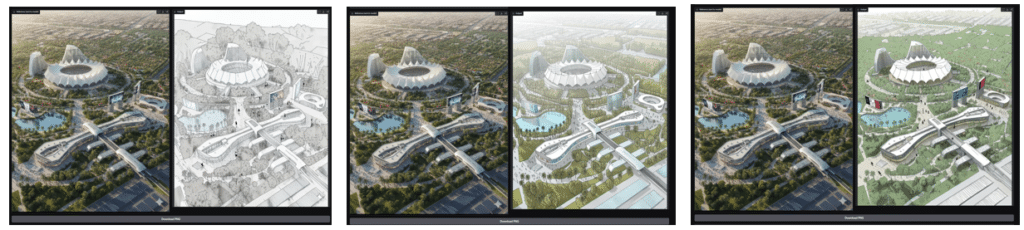
We see the tool’s capability by running highly complex geometries—including curved stadium roofs, intricate pedestrian bridges, layered urban streetscapes, and dense landscapes—through the system.
Whether rendering a bustling city avenue or a quiet park, the geometry remained completely legible and structurally accurate. The only variable that changed was the “hand” that drew it, proving that AI can respect architectural precision while delivering artistic flair.
The Bottom Line
ArchSketch Studio solves a critical problem in architectural communication. It allows a designer to generate and compare multiple representational treatments of the exact same building in mere minutes. By bridging the gap between rigid 3D geometry and the warmth of hand-drawn illustration, ArchSketch Studio ensures that architects no longer have to choose between speed, accuracy, and artistry.


different sketches based on different prompts generated from same image
