
Concept and Design Approach
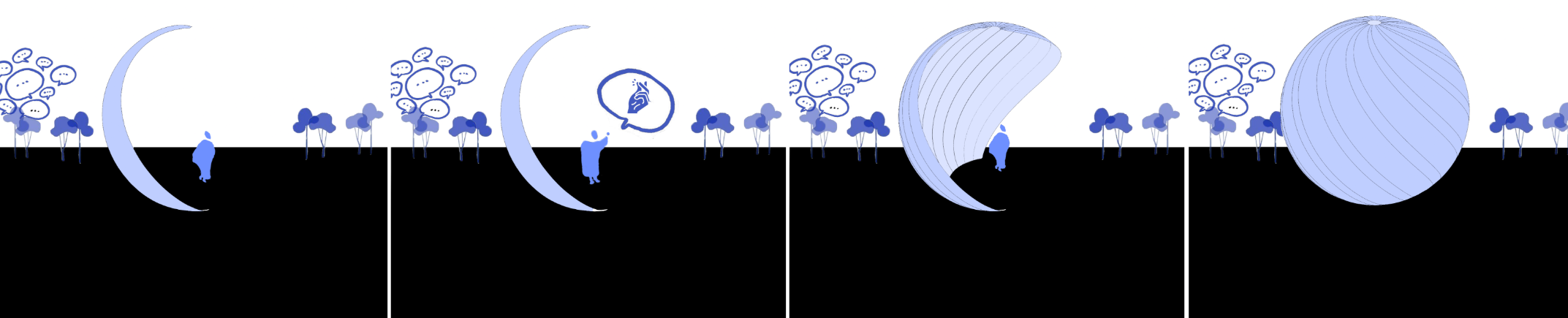
From Sound to Movement explores the relationship between human interaction, environmental conditions, and adaptive architecture. The project proposes an interactive kinetic pavilion that responds to sound, temperature, and manual input through a series of movable shell panels.
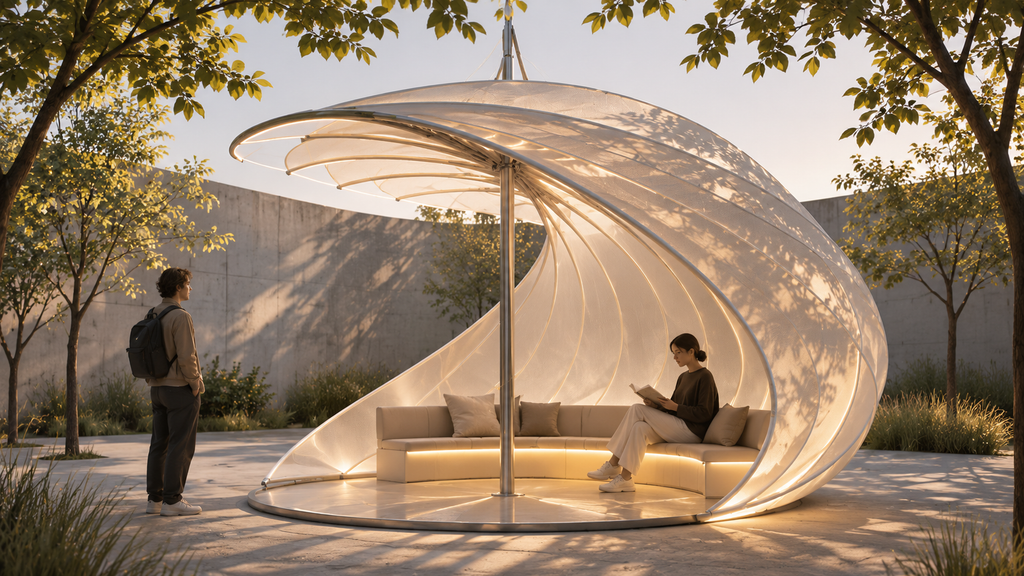
Inspired by the folding mechanism of a fan, the pavilion consists of curved, overlapping panels arranged around a central axis. Their movement allows the structure to transform between different configurations, creating varying degrees of openness, enclosure, and shading.

Parametric Design Exploration
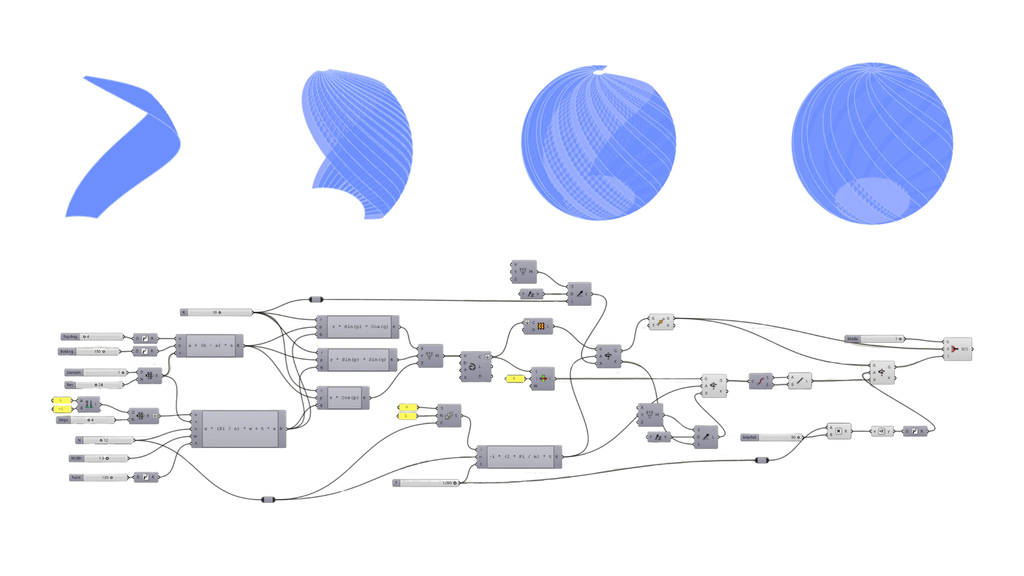
The architectural geometry was developed using Rhino and Grasshopper. Through parametric modelling, different shell configurations were explored by adjusting geometric parameters and studying their transformation.
This digital design process provided an opportunity to investigate how computational geometry could support kinetic movement. The architectural proposal was further developed through visualizations incorporating translucent materials, integrated seating, and lighting to enhance the spatial experience.
Physical Computing and Interactive Systems
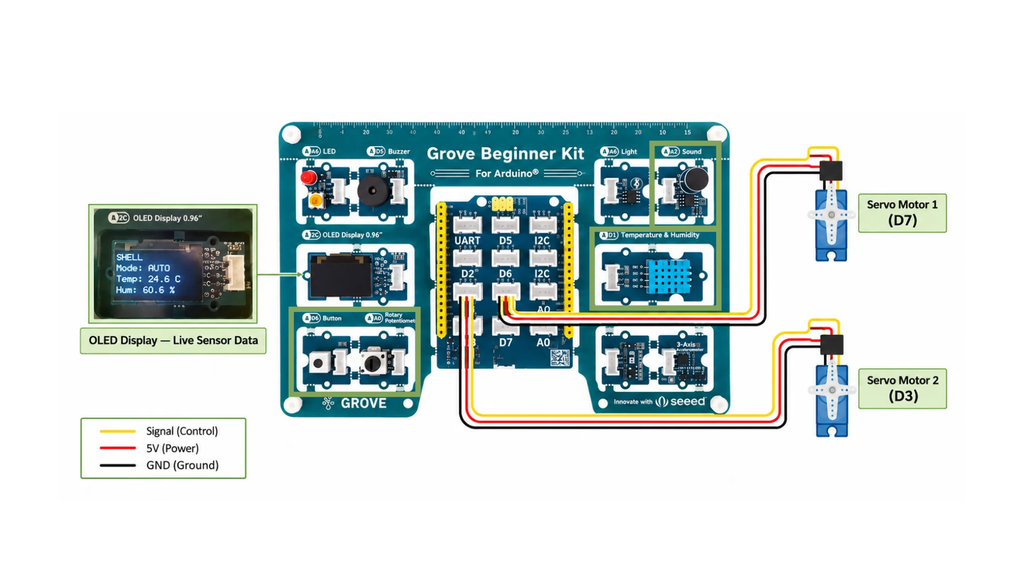
The electronic prototype was developed using a Grove Beginner Kit for Arduino, integrated sensors, and two servo motors. The system was programmed to operate through three interaction modes.
Sound Mode: The sound sensor detects sudden changes in sound intensity, such as a finger snap, triggering the servo motors to alternate between two positions.
Automatic Mode: Temperature and humidity measurements influence the servo angles, demonstrating how environmental data can support responsive architectural systems.
Manual Mode: A rotary potentiometer allows users to directly control the servo positions and explore different movement configurations.
A push button enables switching between these modes, while an OLED display provides real-time information about the selected mode and environmental conditions.
Prototyping and Challenges
Testing demonstrated that the electronic system could successfully operate in all three modes, with two servo motors producing coordinated rotational movement.
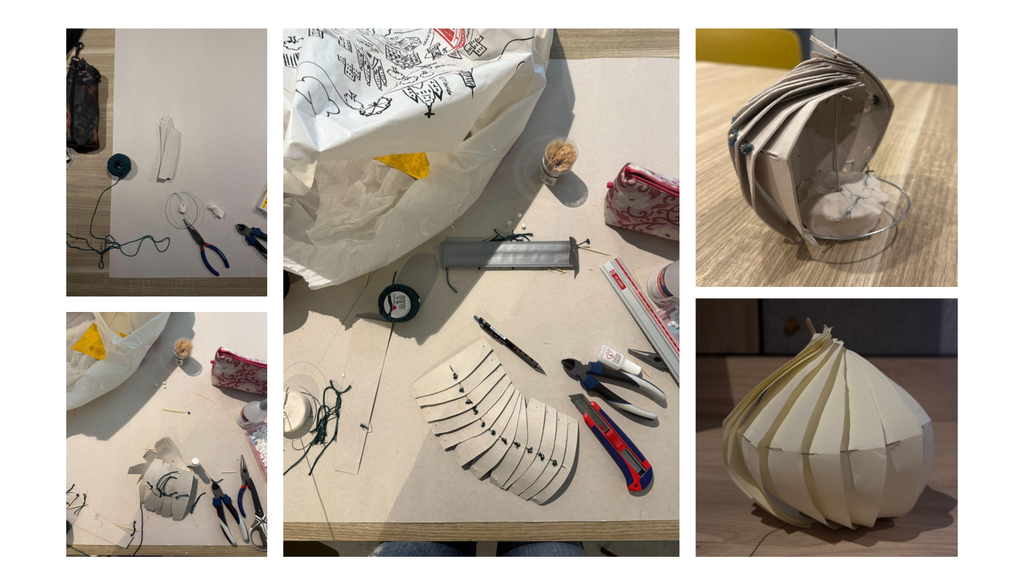
However, translating this electronic response into a functional kinetic structure remains a key challenge. The limited rotation range of the servo motors and the mechanical connection between the motors and the shell panels require further investigation.
While the electronic prototype was tested physically, the architectural shell was developed as a digital design proposal.
Future Development
Future development will focus on refining the mechanical system, improving the connection between digital geometry and physical movement, and exploring alternative motor solutions. A stepper motor may offer a wider rotation range, although its suitability needs to be tested.
Ultimately, From Sound to Movement demonstrates the potential of combining parametric design and physical computing to create architectural environments that can adapt to users and changing environmental conditions.

Arduino Code
#include <Wire.h>
#include <DHT.h>
#include <Servo.h>
#include <U8x8lib.h>
// SENSORS
DHT dht(DHT20);
// SERVOS
Servo servo1;
Servo servo2;
// OLED – WORKING DRIVER
U8X8_SSD1306_128X64_NONAME_HW_I2C oled(U8X8_PIN_NONE);
// PINS
const int potPin = A0;
const int soundPin = A2;
const int buttonPin = 6;
const int servoPin1 = 7;
const int servoPin2 = 3;
// MODES
// 0 = AUTO
// 1 = MANUAL
// 2 = SOUND
int mode = 0;
// SERVO
int angle = 90;
bool isOpen = false;
// SOUND
const int threshold = 450;
unsigned long lastSnapTime = 0;
// BUTTON
int lastButtonState = LOW;
unsigned long lastPressTime = 0;
// TEMPERATURE AND HUMIDITY
float temperature = 0;
float humidity = 0;
bool sensorOK = false;
unsigned long lastSensorRead = 0;
// DISPLAY
unsigned long lastDisplayUpdate = 0;
void setup() {
Serial.begin(9600);
Wire.begin();
dht.begin();
// OLED SETUP – CORRECT DRIVER
oled.setBusClock(100000);
oled.begin();
oled.clear();
oled.setFlipMode(1); // 180 degrees
oled.clear();
oled.setFont(u8x8_font_chroma48medium8_r);
// BUTTON
pinMode(buttonPin, INPUT);
// SERVOS
servo1.attach(servoPin1);
servo2.attach(servoPin2);
servo1.write(angle);
servo2.write(180 – angle);
}
void loop() {
// 1. BUTTON – CHANGE MODE
int buttonState = digitalRead(buttonPin);
if (buttonState == HIGH &&
lastButtonState == LOW &&
millis() – lastPressTime > 250) {
mode = (mode + 1) % 3;
lastPressTime = millis();
if (mode == 2) {
isOpen = (angle > 90);
lastSnapTime = millis();
}
}
lastButtonState = buttonState;
// 2. READ TEMPERATURE AND HUMIDITY
if (lastSensorRead == 0 ||
millis() – lastSensorRead >= 2000) {
lastSensorRead = millis();
float t = dht.readTemperature();
float h = dht.readHumidity();
if (!isnan(t) && !isnan(h)) {
temperature = t;
humidity = h;
sensorOK = true;
}
}
// 3. AUTO MODE
if (mode == 0 && sensorOK) {
float autoAngle =
160 – (temperature – 24.0) * (140.0 / 6.0);
if (humidity > 60) {
autoAngle = autoAngle – 15;
}
angle = constrain((int)autoAngle, 20, 160);
}
// 4. MANUAL MODE
if (mode == 1) {
int potValue = analogRead(potPin);
angle = map(potValue, 0, 1023, 20, 160);
}
// 5. SOUND MODE
if (mode == 2) {
int soundMin = 1023;
int soundMax = 0;
unsigned long startTime = millis();
while (millis() – startTime < 30) {
int value = analogRead(soundPin);
if (value < soundMin) soundMin = value;
if (value > soundMax) soundMax = value;
}
int soundLevel = soundMax – soundMin;
if (soundLevel > threshold &&
millis() – lastSnapTime > 1200) {
isOpen = !isOpen;
if (isOpen) {
angle = 160;
} else {
angle = 20;
}
lastSnapTime = millis();
Serial.print(“SNAP! Sound: “);
Serial.println(soundLevel);
}
}
// 6. MOVE BOTH SERVOS
servo1.write(angle);
servo2.write(180 – angle);
// 7. OLED DISPLAY
if (millis() – lastDisplayUpdate >= 500) {
lastDisplayUpdate = millis();
oled.clearLine(0);
oled.setCursor(0, 0);
oled.print(“SHELL”);
oled.clearLine(2);
oled.setCursor(0, 2);
oled.print(“Mode: “);
if (mode == 0) oled.print(“AUTO”);
if (mode == 1) oled.print(“MANUAL”);
if (mode == 2) oled.print(“SOUND”);
oled.clearLine(4);
oled.setCursor(0, 4);
oled.print(“Temp: “);
if (sensorOK) {
oled.print(temperature, 1);
oled.print(” C”);
} else {
oled.print(“–“);
}
oled.clearLine(6);
oled.setCursor(0, 6);
oled.print(“Hum: “);
if (sensorOK) {
oled.print(humidity, 1);
oled.print(” %”);
} else {
oled.print(“–“);
}
// SERIAL MONITOR
Serial.print(“Mode: “);
if (mode == 0) Serial.print(“AUTO”);
if (mode == 1) Serial.print(“MANUAL”);
if (mode == 2) Serial.print(“SOUND”);
Serial.print(” Temp: “);
Serial.print(temperature);
Serial.print(” Hum: “);
Serial.print(humidity);
Serial.print(” Angle: “);
Serial.println(angle);
}
delay(10);
