
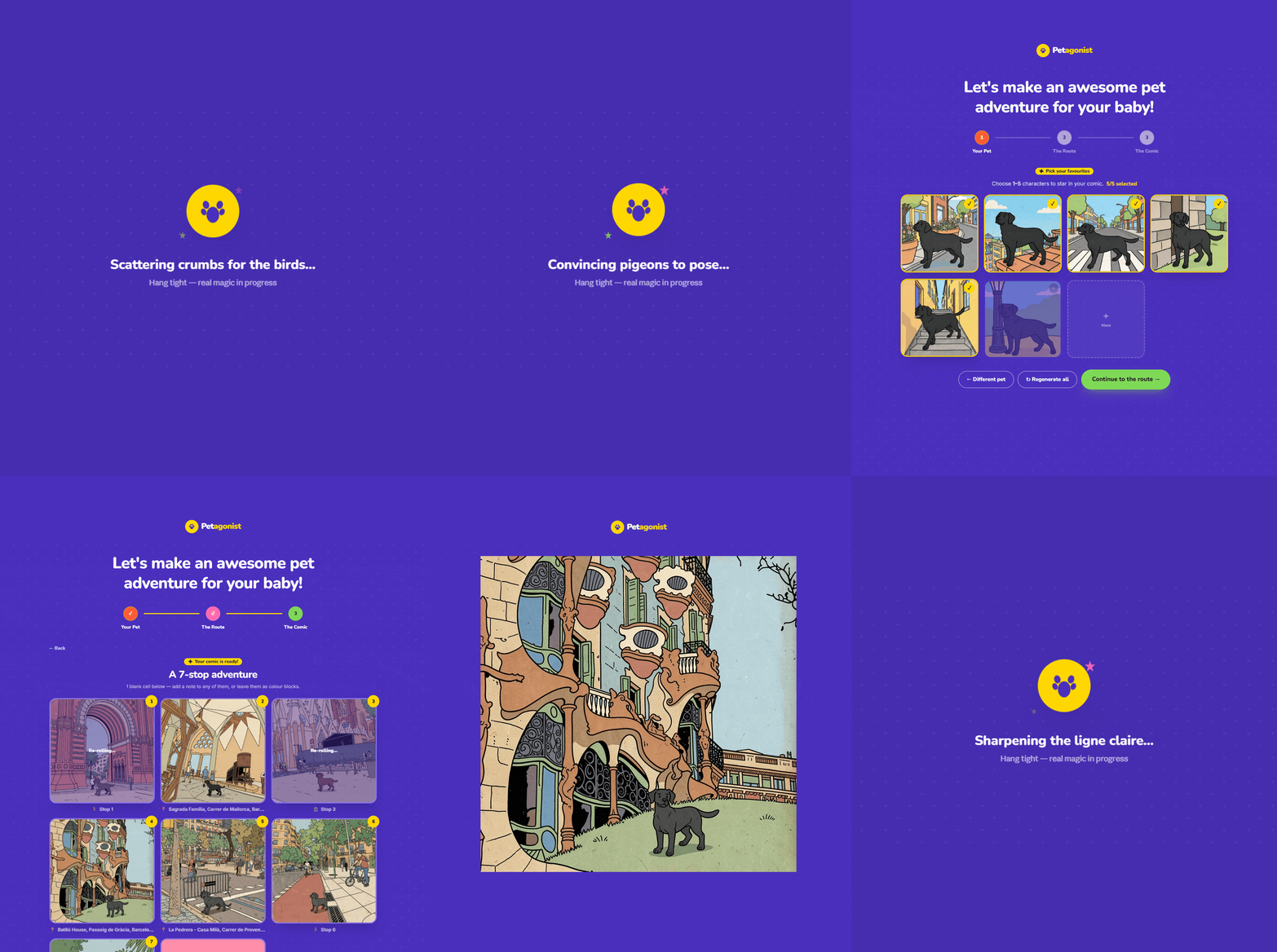
Petagonist is a LoRA exploration and interface project built from the desire to see our beloved pets in funny scenarios and travel-worthy environments.
The project started with a simple wish: seeing our pets somewhere other than the couch. Our pets spend most of their lives asleep at home. But what if we could place them next to the Sagrada Familia? the Eiffel Tower? the Las Vegas Welcome Sign? What if that silly face they make could be immortalized in a comic strip, one where they’re adventuring through real Barcelona streets?
The Tintin ligne-claire style is very recognizable with its flat colors, bold outlines, expressive but simple characters. It felt like the right aesthetic for pet comics. Playful, nostalgic, and (we thought) achievable with a LoRA.
The biggest lessons from this project came from caption writing, dataset curation, and learning what the model was actually picking up from our training data versus what we assumed it was learning.
Petagonist is a web app that takes a single pet photo and turns it into a printable Tintin-style comic, set against real street-level photography from places you choose on a map. The user never trains a model or writes a prompt. They upload a photo, pick locations on a map of Barcelona, and get back a comic they can print as a strip or fold into a zine. Behind that simple flow is a pipeline that chains two LoRAs, a ControlNet, the Mapillary street photo API, and a set of fallback systems that keep everything working even when parts of the pipeline are down.
The LoRA Opportunity
The Tintin ligne-claire look (flat colors, bold outlines, simplified features) is distinctive, and existing LoRA models are pretty good if you know the right parameters or not so finnicky about consistency like us. When we ran the same pet through a general Tintin-style LoRA multiple times, we got different fur colors, different eye styles, different proportions. The character wasn’t consistent. For a comic strip where the same pet appears in every panel, it just didn’t look right.
Single Pet LoRA
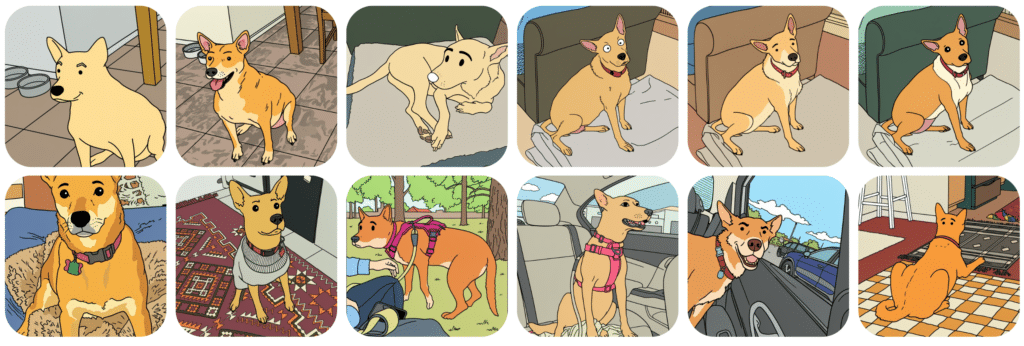
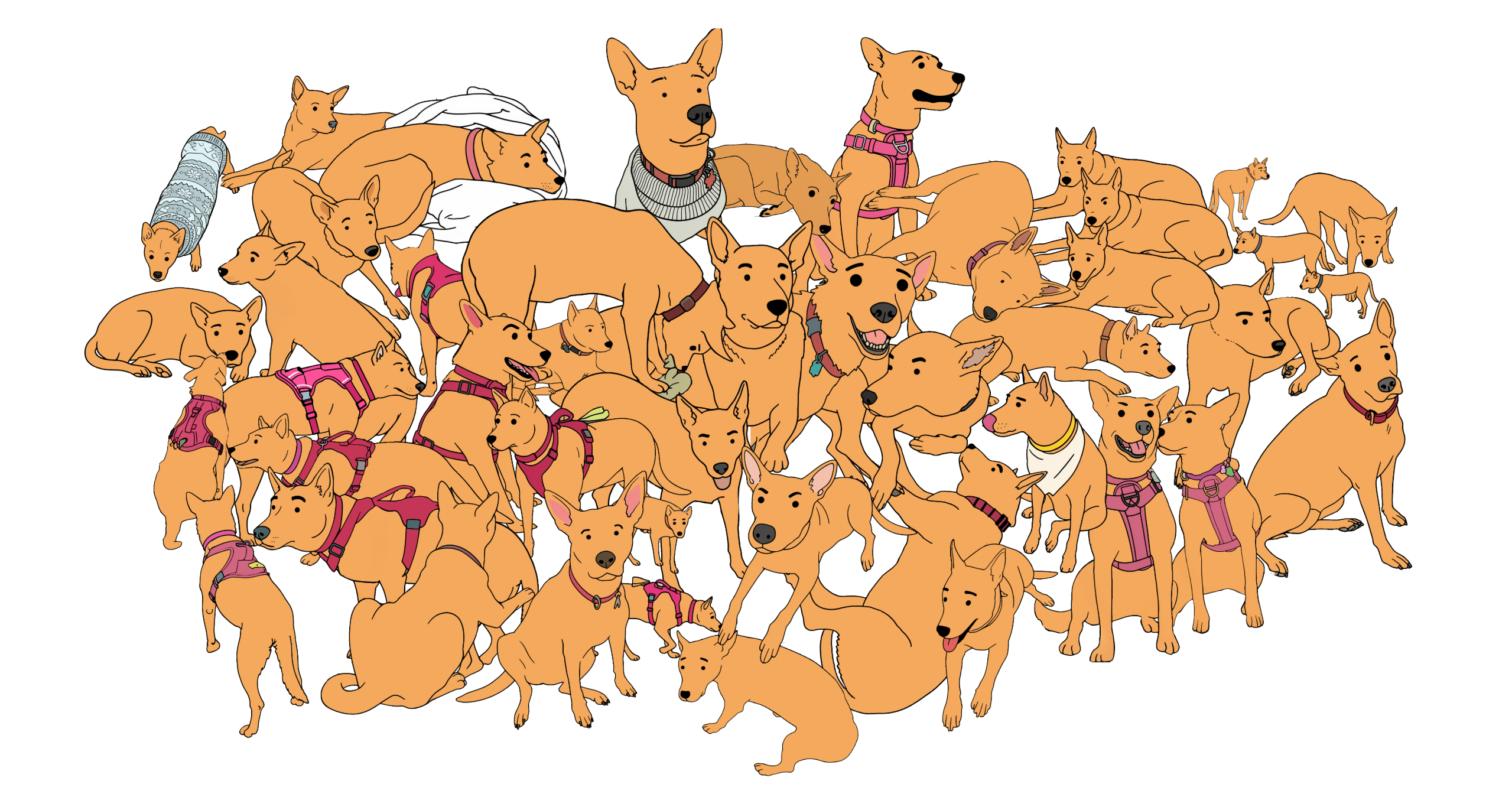
We started with Bella. We took 46 photos and manually redrew each one into a unified comic style: the same golden tan coloring, the same dot eyes, the same line eyebrows, the same pink collar. Every image was captioned with a structured description: trigger word, action, camera view, accessories, and drawing style.
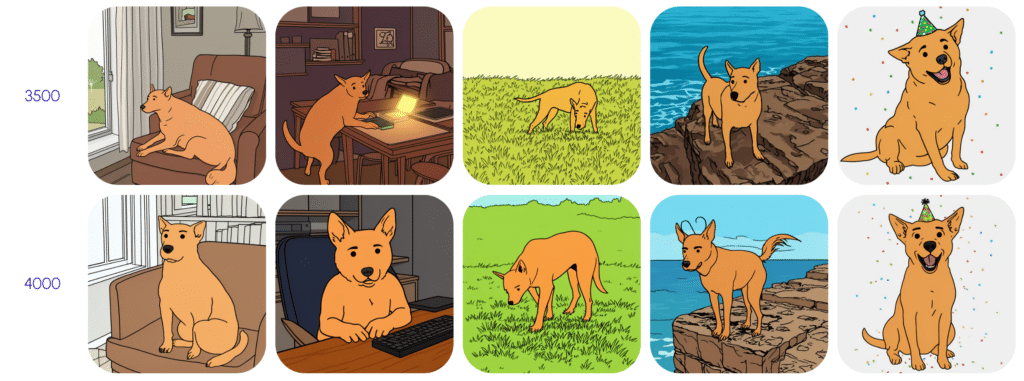
Training worked best between 3,500 and 4,000 steps. This makes sense because our dataset was more varied than the typical 30-image LoRA baseline (46 images across many poses), so the model needed more iterations to fully learn the concept. At 4000, some overfitting starts happening- notice the 2nd row such as on the first photo where the tail is separated and looks like a paw and on the 4th photo where the dog gains antennae.
Further text or image to image tests showed amazing results. Most consistent at 1.75 to 2.0 LoRA strength, and noticeably better when the pet was described directly in the text prompt rather than relying on the trigger word alone.
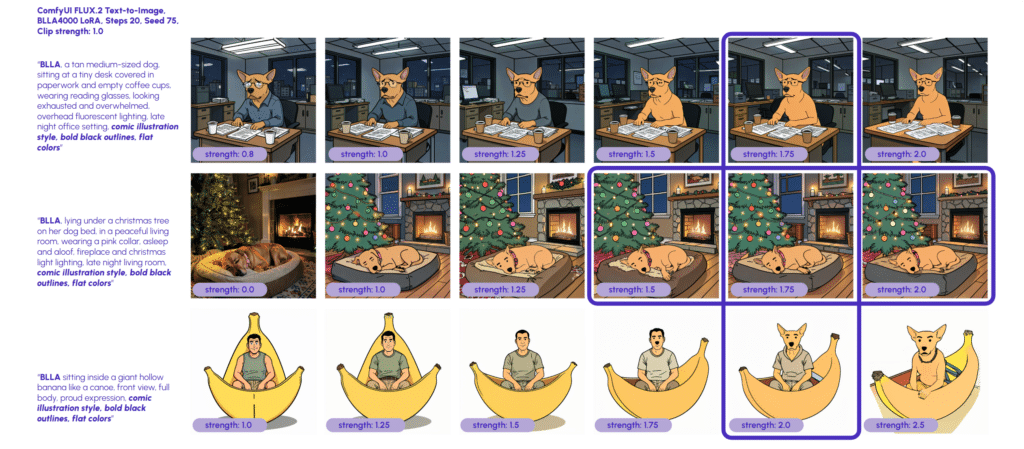
We learned that because we described the drawing style in the captions (“comic illustration style, bold black outlines, flat colors”), the model didn’t learn that the trigger word should carry the style. The style was tied to the caption text, not the trigger word. So the model only produced good results when we explicitly prompted for the style.
Scaling the Approach: Four Options
This single-pet LoRA worked, but it only worked for Bella. Our goal was to enable users to upload any pet and get comic-style character images right away. So we looked at four approaches:
• User-trained LoRA: have users upload 5 photos and train a LoRA on the fly. Too slow and too expensive for an interactive app.
• Face-style LoRA: train a model on facial features only, letting users choose from preset face styles. Interesting but limited, because separating style from body creates compositing issues.
• Tintin LoRA only: rely on a general Tintin-style model with no pet-specific training. We already knew this produced inconsistent characters.
• Multi-pet LoRA: train a single model on many different animals, all drawn in the same consistent comic style. If it worked, it would handle any pet without additional training.
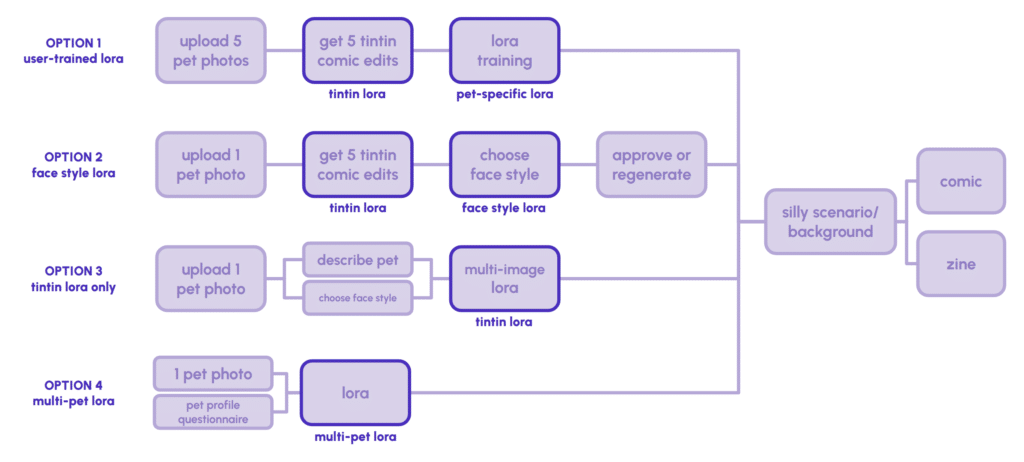
We chose Option 4. We already proved the approach worked on one pet. The question was whether it could generalize.
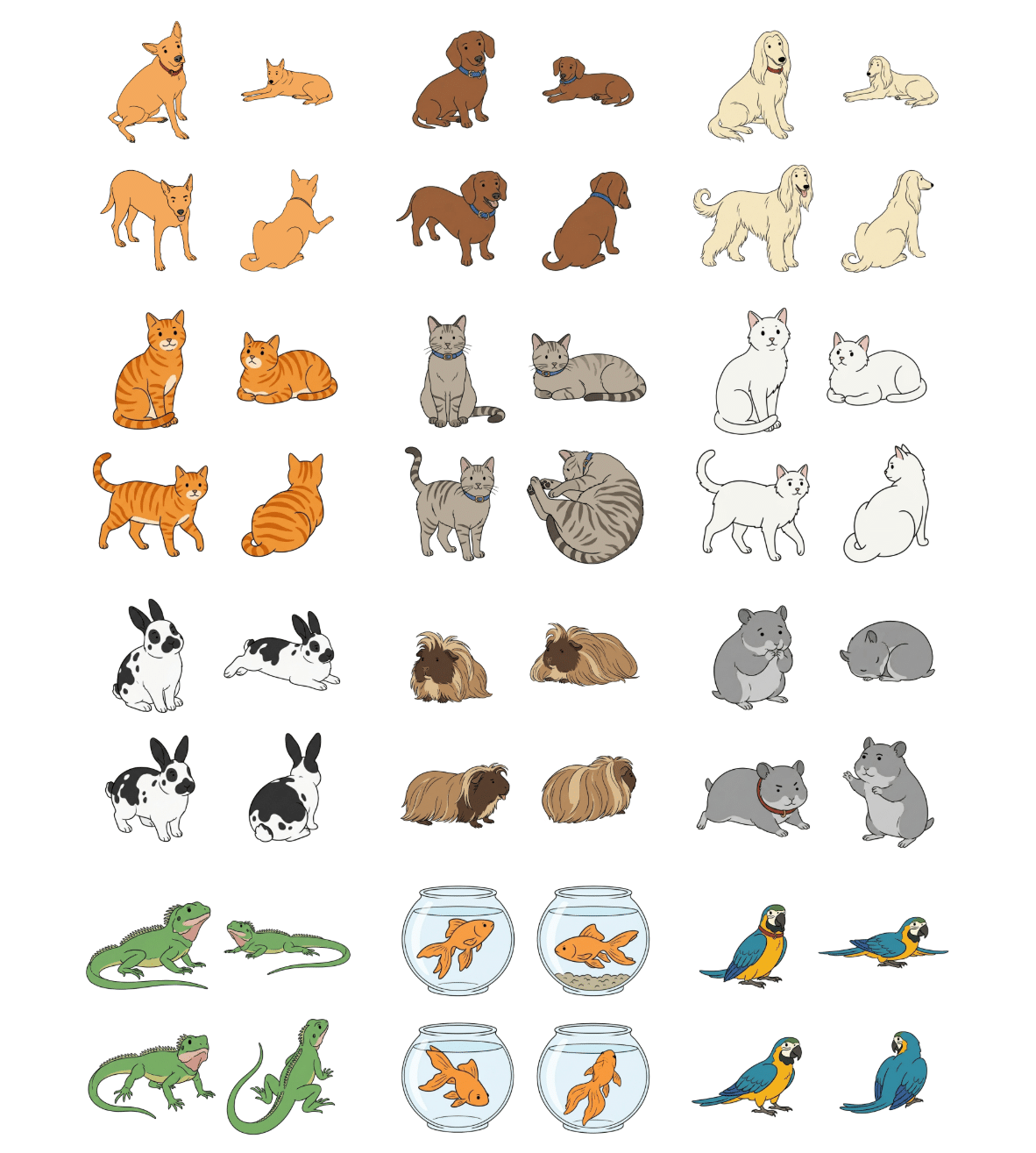
Multi-Pet LoRA
The multi-pet dataset needed diversity: dogs, cats, hamsters, different species, breeds, body shapes, and poses. But the comic style had to stay consistent. Every image maintained the same flat color, bold black outlines, dot eyes, and line eyebrows, regardless of the animal.
We removed one set of cats from the dataset because they were overrepresented compared to other animal types. Too many similar shapes would bias the model. And this time, we omitted the style descriptions from the captions entirely. Where the Single-pet LoRA’s captions said “comic illustration style, bold black outlines, flat colors,” the Multi-pet LoRA’s captions only described the animal and its pose. This forced the trigger word itself to carry the style, fixing the issue from the first model.
Captions followed this structure:
“PETAGONIST, medium-sized tan dog, mixed breed, short smooth coat, golden tan fur, red collar, sitting pose, facing front-left, three-quarter view, white background“
No style descriptors. The model had to learn that PETAGONIST means comic style.
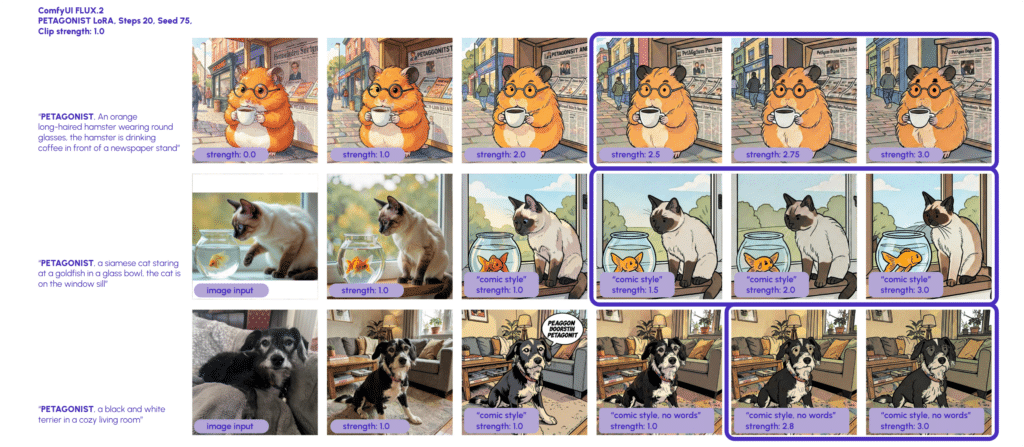
The results were great. The face style stayed consistent across completely different animals. Dogs, cats, hamsters all got the same dot eyes and line eyebrows. This model works best at a higher LoRA strength (1.5 to 3.0 range), and text prompts don’t need to be long. We found that appending “comic style, no words” helps, so we add that automatically in the backend.
The Pipeline: Putting the LoRAs to Work
With the multi-pet LoRA working, the next question was how to actually build comic panels. We have a pet that needs to look consistent, and a real street photo that needs to look like a Tintin background. How do those come together?
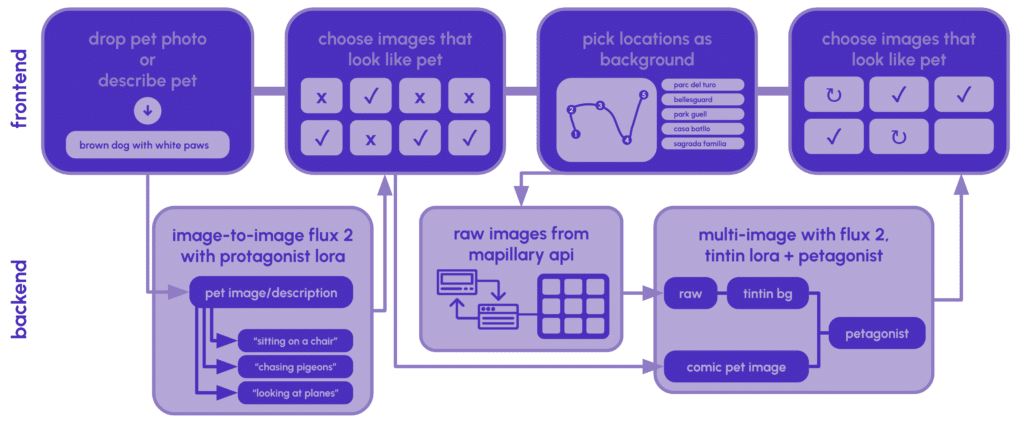
Pet variants are the simpler half. The user’s photo and description get combined with a pose prompt (“sitting at a café terrace,” “chasing pigeons in a plaza”) and run through Flux image-to-image with the Petagonist LoRA. The LoRA handles the style, and the pose prompt handles the scenario. We generate 8 of these, and the user picks the ones that look most like their pet.
Scene compositing took more iteration. Our first attempt was to take the comic-style pet variant and the raw Mapillary street photo, put them together, and run the combined image through a single LoRA pass. The results were bad. Because both images went through the Tintin LoRA together, it undid the styling of the pet variant. The pet’s face, colors, and proportions came out inconsistent, which defeated the whole point of training a LoRA for character consistency.
We found that the two LoRAs are each good at different things. The Tintin LoRA is strong at restyling environments: it turns a raw photo into a clean ligne-claire background without losing the spatial structure. The Petagonist LoRA is focused on the pet: it knows how to place a consistent character into a scene while preserving breed, color, and markings.
So the pipeline has to work in sequence. First, the street photo goes through the Tintin LoRA with ControlNet, which restyles the background while preserving the scene geometry. Then the tintinified background and the pet variant go through the Petagonist LoRA together, which composites the pet into the scene. The background isn’t affected in this second pass other than for the compositing, so the Tintin style holds and the pet stays consistent.
The Application: From Pet Photo to Printed Comic
With the LoRA working across any pet, we built the interface around it. Petagonist is a React + FastAPI web app that takes users through three steps: upload your pet, pick a route on a map, and generate a comic.
Step 1: Your Pet
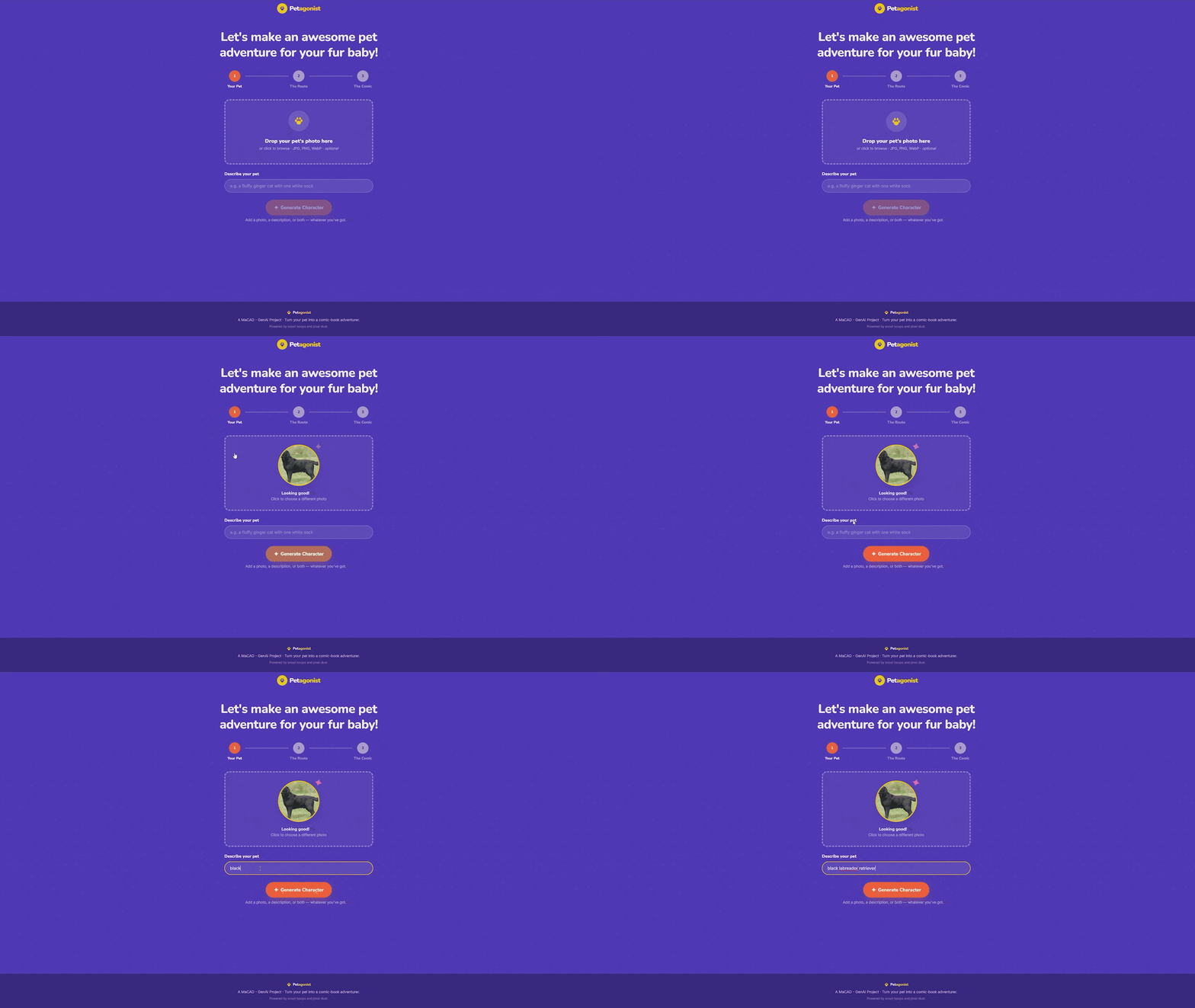
The user uploads a photo of their pet, writes a text description, or both. Either input is enough on its own. But having both inputs is better for pets with distinctive markings. A stronger more descriptive text prompt of the breed, color, and features is appreciated by the workflow provided it is around 75 tokens (50-60 words).
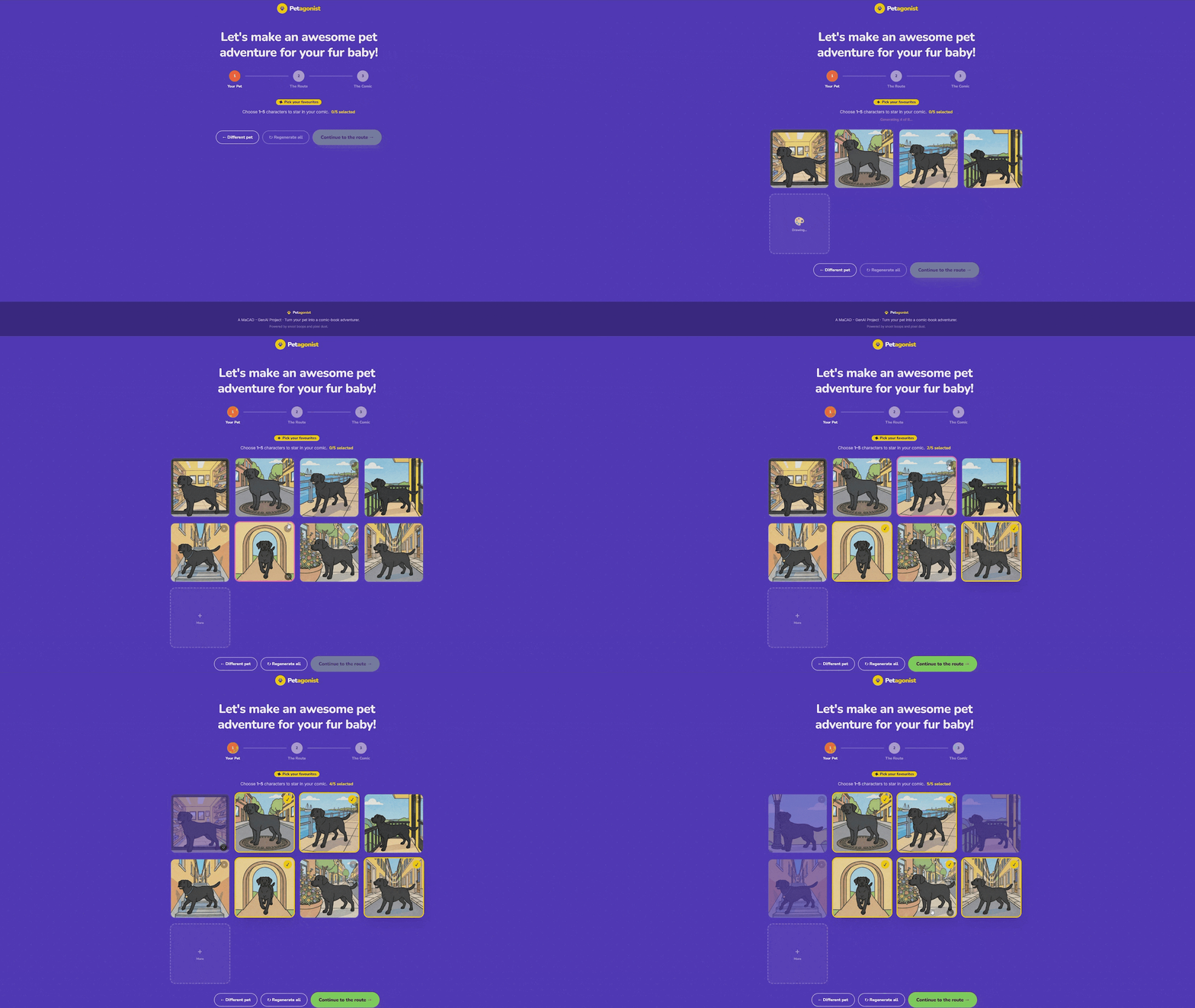
In the backend, the input gets paired with pose prompts. We wrote a bank of 30 scenarios, things like “sitting on a café terrace chair,” “chasing pigeons in a plaza,” “standing at a bus stop reading a tiny map.” Eight are randomly sampled per generation. Each prompt gets combined with the pet description and our style suffix, then sent through Flux image-to-image with the Petagonist LoRA.
The variants stream into the frontend one by one as they finish. The user picks up to five that look most like their pet, and those become the characters that appear in the comic panels. If none of the first batch looks right, they can regenerate the whole set, generate a few more, or re-roll individual cards.
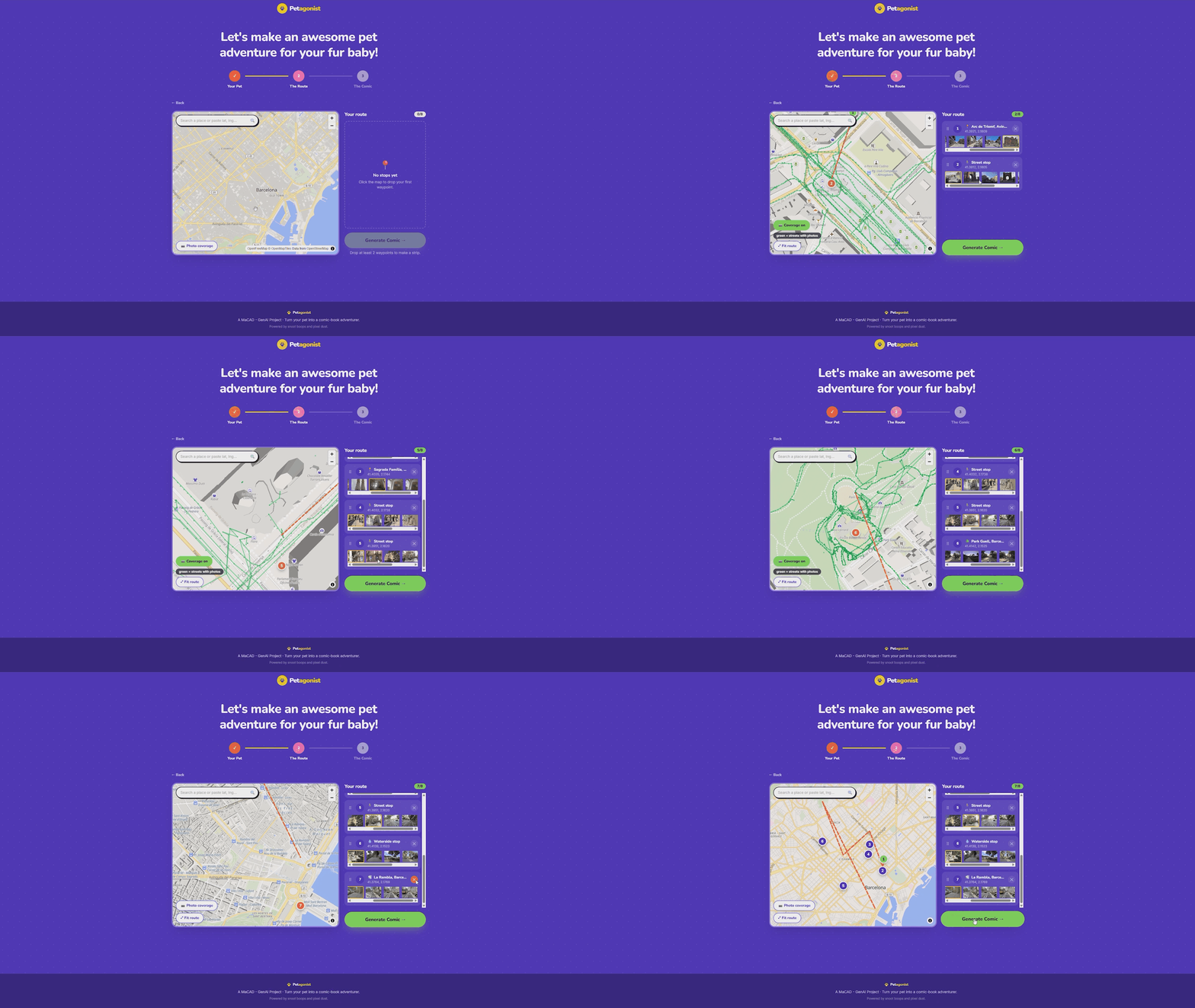
Step 2: The Route
This is where the comic gets its setting. The map uses MapLibre GL JS with OpenFreeMap’s vector basemap, which is entirely token-free with no Mapbox dependency.
Users build their pet’s adventure route by clicking locations on the map or searching for a place by name. The search uses Photon (Komoot’s geocoder) and also accepts raw latitude/longitude coordinates. Each click drops a numbered pin connected by a dashed route line.
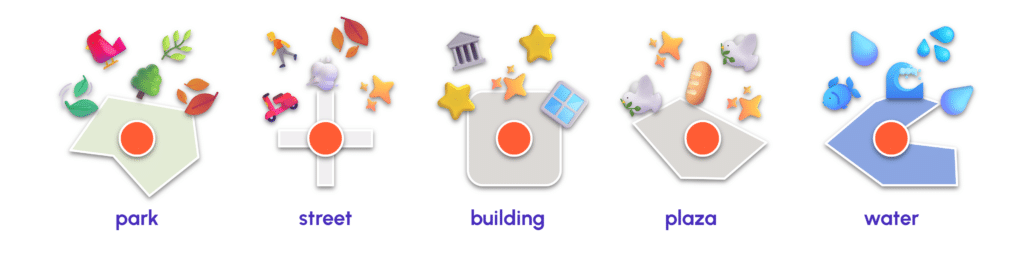
With the use of vector basemap, when a user clicks the map, the app reads the vector tile features under the click point to automatically classify what kind of place it is: park, waterside, plaza, building, or street. This classification drives the pin’s icon (a tree for parks, a water droplet for waterside, a pigeon for plazas) and triggers a burst of themed emoji from the click point as playful feedback. The classification also flows through to the backend, where it informs the fallback scene if no street photography is available at that location.
As each pin is dropped, the frontend sends a request to the Mapillary API to search for real street-level photographs near that coordinate. The backend proxies these requests so the Mapillary token stays server-side and never reaches the browser. The search expands outward in three radius bands (60 meters, then 150, then 350) until it finds coverage. Results are ranked: flat photos over panoramas, closer over farther, newer over older. Up to six thumbnail candidates appear under each waypoint in the sidebar, and the user can pick which street photo they want as the background for that panel.
There’s also a toggleable Mapillary coverage overlay on the map that shows green dots and lines where street photos exist, so users can place pins where there’s actually coverage.
Step 3: The Comic
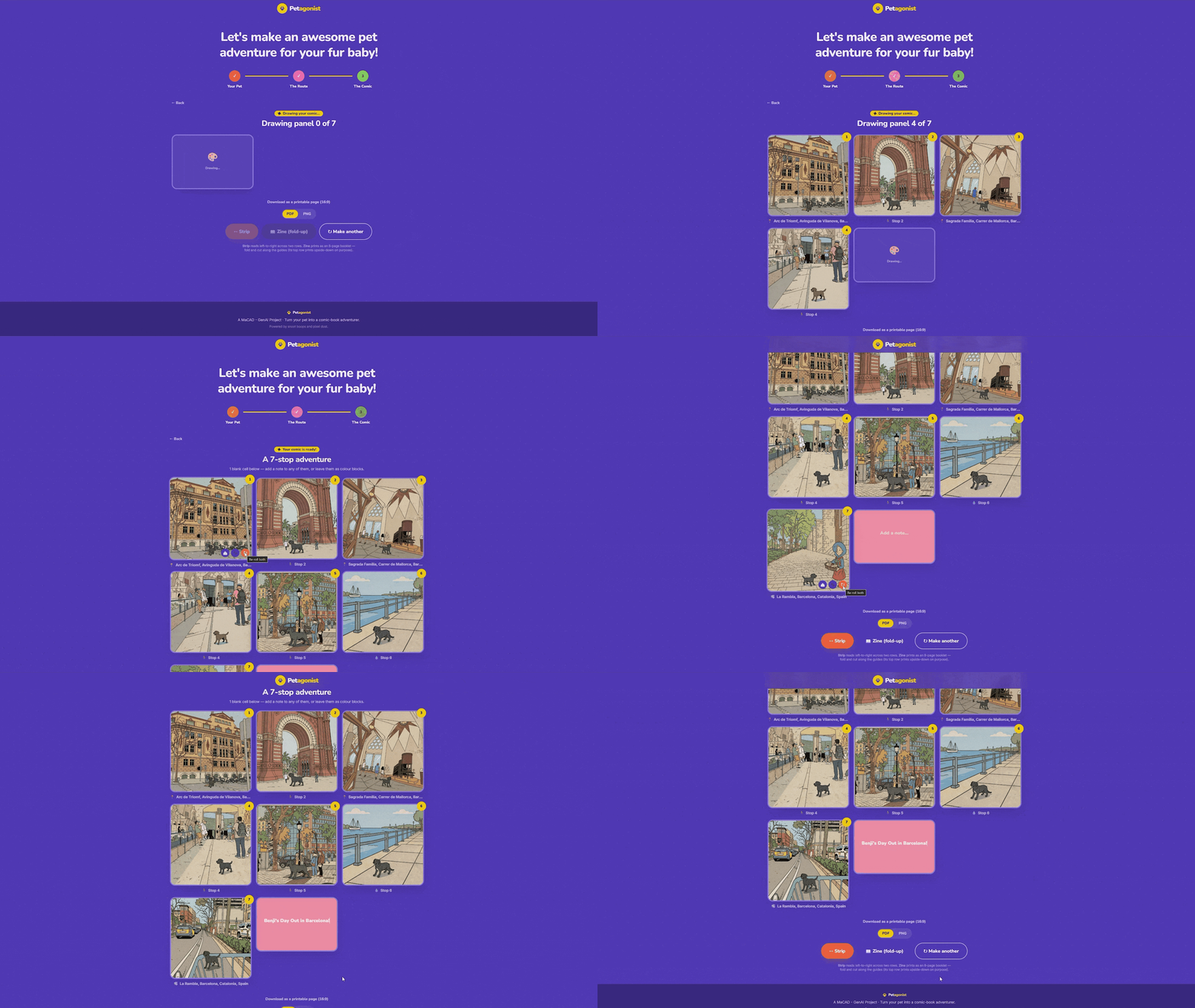
When the user hits “Generate Comic,” each stop becomes a comic panel, running through the two-pass pipeline described above: restyle the background, then composite the pet in. Panels stream into the frontend as they finish.
If Mapillary has no coverage at a particular stop, the app doesn’t break. It draws a themed placeholder scene using Pillow: a park with trees and birds, a waterfront with a sailboat, a street with colorful buildings, all based on the place-type classification from Step 2. The sky palette varies with the re-roll seed, so re-rolling feels like a different time of day.
The result is a three-column grid with eight cells. Panels fill in with comic art, and any stops the user didn’t place become colored blank cells that can be captioned, useful for title cards or “The End” panels. Each generated panel has split re-roll controls on hover: one button re-rolls just the background (cycling to a different Mapillary photo or scene variation), one re-rolls just the character (swapping in a different pose), and one re-rolls both together. No need to regenerate the whole comic for one panel that doesn’t look right.
Output: The 8-Panel Zine
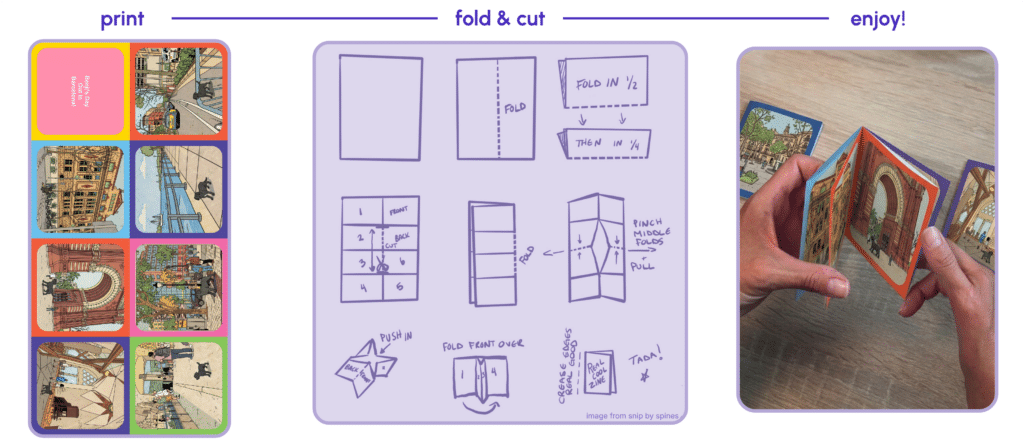
The final comic exports in zine format, laid out on a 17 x 11 inch tabloid page at 150 DPI. The zine is an 8-page mini-booklet imposition. The top row is rotated 180 degrees so that when the page is printed, cut, and folded, it forms a pocket-sized zine that reads in the correct order.
Each cell sits inside a colored frame with rounded inner corners. The frame colors double as visual cut and fold guides. And can be exported as PDF or PNG.
Technical Stack
Frontend: React 18, Vite, Tailwind CSS v4 (CSS-first @theme design tokens), MapLibre GL JS
Backend: FastAPI, Pillow (image processing and fallback rendering)
Map: OpenFreeMap (token-free vector basemap), Photon geocoder
Street photography: Mapillary API (token proxied server-side)
Image generation: ComfyUI with Flux, Petagonist LoRA (multi-pet), Tintin-style LoRA (scene restyle), ControlNet (geometry preservation)
State: Currently only In-memory (no database) for the demo and thesis scope
Reflection
What made this project most interesting were our findings along the process. Even when tests weren’t turning out well, there was always an understandable reason behind it, something we could do something about and improve from. The difference between our LoRA attempts wasn’t more data or more compute. It was understanding what the model was actually learning from our captions, and then changing the captions. Removing the style descriptions and letting the trigger word absorb the visual identity was a small edit that completely changed how the model behaved. We figured that out by iterating and paying attention to what’s going wrong and having a vision to what this project is about.
The map interface was inspired by faculty James McBennett, and we really liked the direction because AI-generated content is more fun when it’s connected to real places. The Mapillary photos are what make the comic feel like it’s actually set in Barcelona instead of some vague European city. Behind the scenes, the coverage overlay and expanding-radius search make that connection reliable, and Pillow fallback scenes keep the experience working even when there’s no photo coverage at a particular spot.
What we hope users feel most is that they’re a part of the process, because they’re the ones designing the route their pet adventures through.
Petagonist is currently only demo app. But the pattern (LoRA for character consistency, real photography for setting, two-pass compositing for putting the character into the scene) could work beyond pets and comics. Anywhere you want to place a consistent character into real environments with a specific visual style, this pipeline is a starting point.
