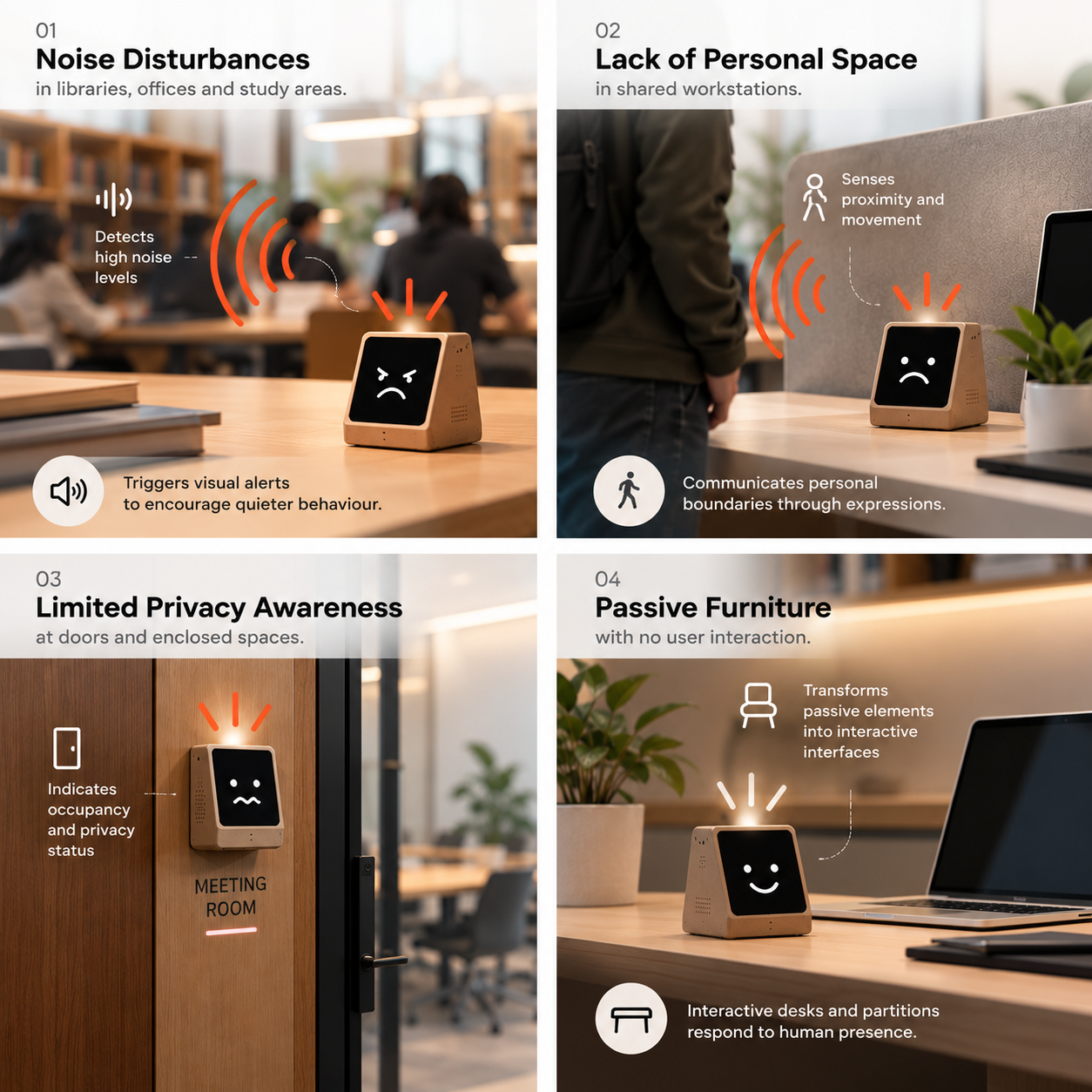
He likes your company… just not too close, and definitely not too loud.
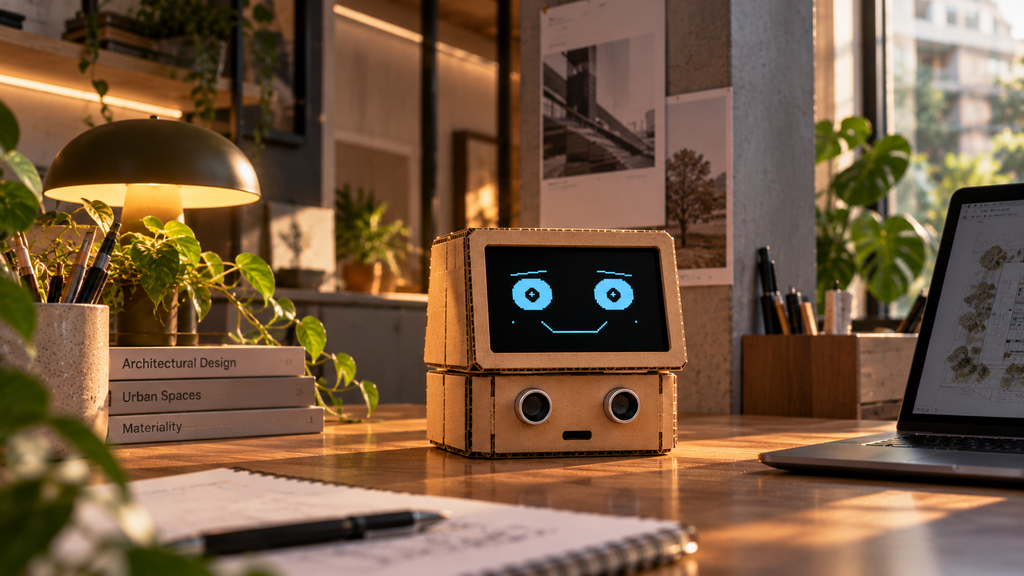
We all know someone who enjoys company but needs their space. Dobby the IntroBOT is a playful desk companion built around that feeling. Inspired by introverts, who value personal space and quiet surroundings, Dobby watches how people approach it and listens to the room, then shows how it feels through an animated face and sound. Approach calmly and it stays happy. Come closer slowly or make some noise and it becomes uneasy. Rush in or shout, and it gets worried and sounds an alarm.
Beyond a desk toy, Dobby explores a bigger design idea: turning everyday architectural elements into responsive, human-centred interfaces that make people more aware of each other’s comfort.
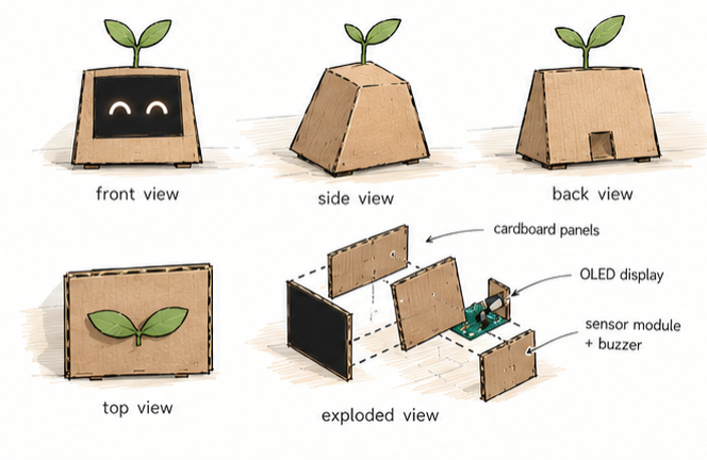
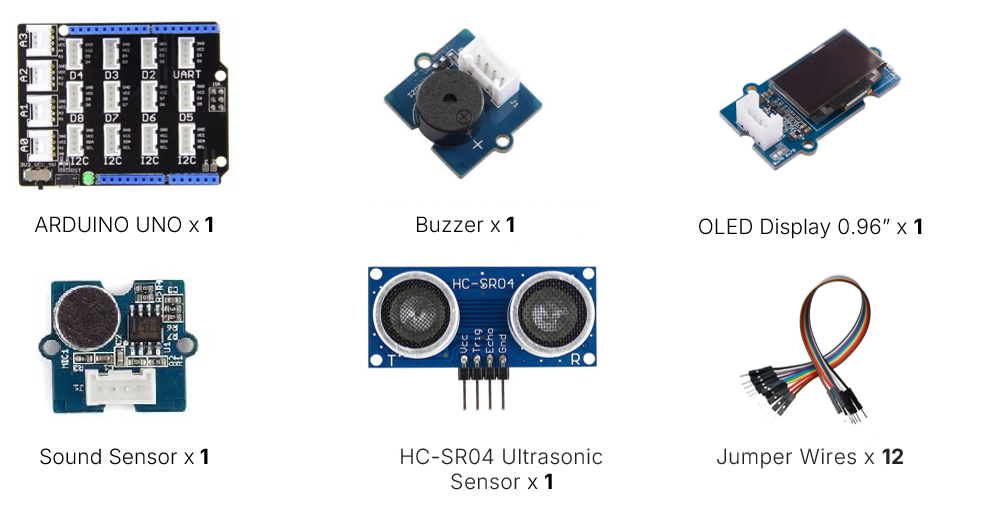
COMPONENTS (BOM)
HOW IT WORKS
An ultrasonic sensor measures distance many times per second. By comparing each reading with the previous one and the time between them, Dobby works out how fast someone is approaching. It only counts movement within 4 m and only when the distance is shrinking. A sound sensor listens for 50 ms at a time and measures the gap between the loudest and quietest values, which gives a stable volume level. Both values are smoothed with a moving average of the last five readings, so one noisy reading can’t change Dobby’s mood.
CIRCUIT DIAGRAM
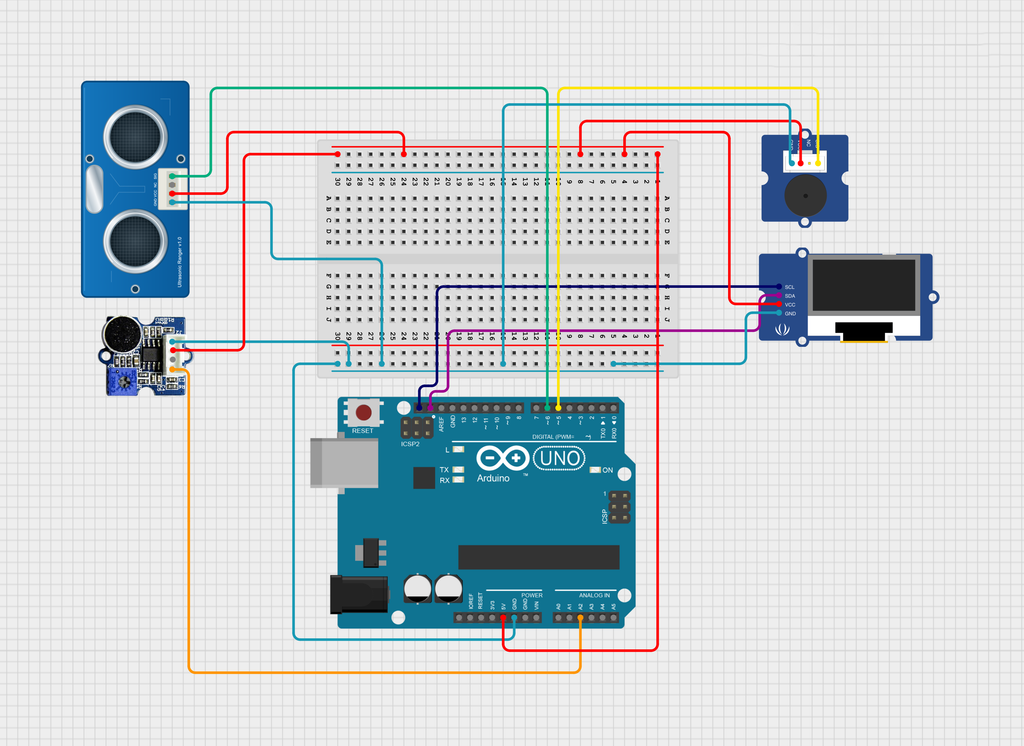
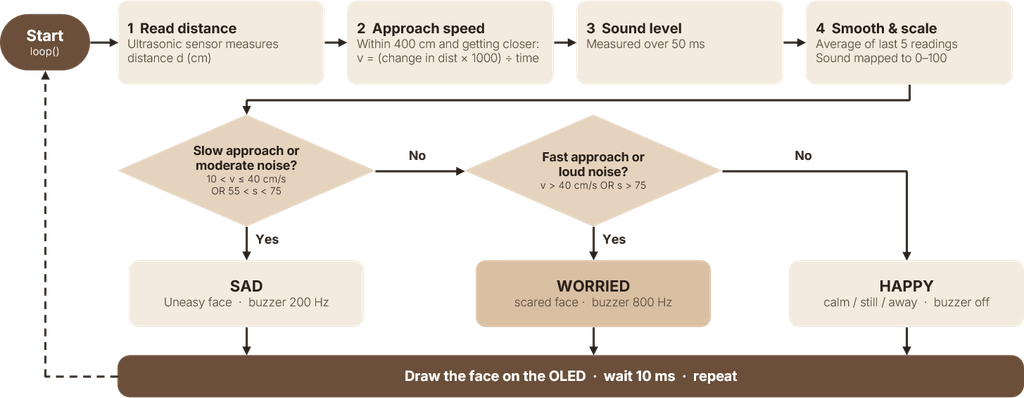
The Arduino then decides how Dobby feels. A slow approach (10–40 cm/s) or moderate noise makes it Sad, with a low 200 Hz tone. A fast approach (over 40 cm/s) or loud noise makes it Worried, with a sharp 800 Hz tone. Otherwise it stays Happy and quiet. The face is drawn on the OLED from simple lines and circles, and it blinks, glances around and gently bobs, so Dobby always feels alive.
LOGIC FLOW CHART
MAIN CODE
//Ultrasound Library
#include “Ultrasonic.h” // CM: using the library again
//Face Library
#include <Wire.h>
#include “Faces.h”
Ultrasonic ultrasonic(6); // CM: sensor on D6
#define BUZZER_PIN 5
#define SOUND_PIN A2
#define MAX_RANGE 400 // detection range in cm
#define WINDOW_SIZE 5 // average size
#define FAST_SPEED 40 //
#define SLOW_SPEED 25 //
long prevDist = 0; // previous distance
unsigned long prevTime = 0; // time of previous distance
long speedSamples[WINDOW_SIZE] = { 0 }; // moving average buffer
long speedSmoothed = 0;
long soundSamples[WINDOW_SIZE] = { 0 }; // moving average buffer
long soundSmoothed = 0;
long nSamples = 0;
Emotion mood = HAPPY;
long readSoundLevel() {
unsigned long start = millis();
int highest = 0;
int lowest = 1023;
while (millis() – start < 50) {
int value = analogRead(SOUND_PIN);
if (value > highest) highest = value;
if (value < lowest) lowest = value;
}
return highest – lowest;
}
void setup() {
Serial.begin(9600);
pinMode(BUZZER_PIN, OUTPUT);
pinMode(SOUND_PIN, INPUT);
Wire.begin();
faceBegin(0x3D); // start the face screen
}
void loop() {
long currdist = ultrasonic.MeasureInCentimeters(); // CM: measuring distance in cm
unsigned long currtime = millis();
long speed = 0;
bool inRange = (currdist > 0 && currdist <= MAX_RANGE && prevDist > 0 && prevDist <= MAX_RANGE); //checking if object is out of range
if (inRange) {
long diff = prevDist – currdist; // distance moved
unsigned long timeframe = currtime – prevTime; // time passed between movement
if (diff > 0 && timeframe > 0) {
speed = diff * 1000 / (long)timeframe; // Ccm/s
}
}
long sound = readSoundLevel();
soundSamples[nSamples % WINDOW_SIZE] = sound;
soundSmoothed = 0;
//Smoothening the speed
speedSamples[nSamples % WINDOW_SIZE] = speed;
nSamples += 1;
speedSmoothed = 0;
for (int i = 0; i < WINDOW_SIZE; i++) {
speedSmoothed += speedSamples[i];
soundSmoothed += soundSamples[i];
}
speedSmoothed = speedSmoothed / WINDOW_SIZE;
soundSmoothed = soundSmoothed / WINDOW_SIZE;
soundSmoothed = map(soundSmoothed, 150, 600, 0, 100);
// Overwriting as “previous” for next loop
prevDist = currdist;
prevTime = currtime;
// Printing
Serial.print(“distance:”);
Serial.print(currdist);
Serial.print(” speed:”);
Serial.println(speedSmoothed);
Serial.print(” sound:”);
Serial.println(soundSmoothed);
// Reaction
if ((speedSmoothed > 10 && speedSmoothed <= FAST_SPEED) || (soundSmoothed > 35 && soundSmoothed < 75)) { // slow approach
tone(BUZZER_PIN, 200);
mood = SAD;
} else if (speedSmoothed > FAST_SPEED || soundSmoothed > 60) { // fast approach
tone(BUZZER_PIN, 800);
mood = WORRIED;
} else {
noTone(BUZZER_PIN); // away
mood = HAPPY;
}
drawFace(mood); // showing the mood
delay(10);
}
FACIAL EXPRESSION CODE
#include “Faces.h”
#include <Wire.h>
#include <Adafruit_GFX.h>
#include <Adafruit_SSD1306.h>
#include <math.h>
#define FACE_WIDTH 128
#define FACE_HEIGHT 64
// The display object lives here, hidden from the main sketch
static Adafruit_SSD1306 face(FACE_WIDTH, FACE_HEIGHT, &Wire, -1);
// Eye positions shared by every emotion
static const int LEFT_X = 39;
static const int RIGHT_X = 89;
static void drawEye(int x, int y, int pupilX, int pupilY,
int eyeWidth, int eyeHeight) {
face.fillRoundRect(x – eyeWidth / 2, y – eyeHeight / 2,
eyeWidth, eyeHeight, eyeHeight / 2,
SSD1306_WHITE);
face.fillCircle(pupilX, pupilY, 4, SSD1306_BLACK);
face.fillCircle(pupilX – 1, pupilY – 1, 1, SSD1306_WHITE);
}
// One function per emotion
// lookX = pupil wobble, eyeY = eye bob, eyeH = blink height
static void drawHappy(int lookX, int eyeY, int eyeH) {
drawEye(LEFT_X, eyeY, LEFT_X + lookX, eyeY, 24, eyeH);
drawEye(RIGHT_X, eyeY, RIGHT_X + lookX, eyeY, 24, eyeH);
// Eyebrows
face.drawLine(27, 13, 46, 10, SSD1306_WHITE);
face.drawLine(80, 10, 99, 13, SSD1306_WHITE);
// Smile
face.drawLine(43, 42, 50, 49, SSD1306_WHITE);
face.drawLine(50, 49, 78, 49, SSD1306_WHITE);
face.drawLine(78, 49, 85, 42, SSD1306_WHITE);
// Cheeks
face.drawPixel(25, 42, SSD1306_WHITE);
face.drawPixel(103, 42, SSD1306_WHITE);
}
static void drawSad(int lookX, int eyeY, int eyeH) {
drawEye(LEFT_X, eyeY + 2, LEFT_X + lookX, eyeY + 2, 24, eyeH);
drawEye(RIGHT_X, eyeY + 2, RIGHT_X + lookX, eyeY + 2, 24, eyeH);
// Eyebrows
face.drawLine(27, 10, 47, 16, SSD1306_WHITE);
face.drawLine(81, 16, 101, 10, SSD1306_WHITE);
// Frown
face.drawLine(44, 51, 52, 44, SSD1306_WHITE);
face.drawLine(52, 44, 76, 44, SSD1306_WHITE);
face.drawLine(76, 44, 84, 51, SSD1306_WHITE);
// Tears
face.drawLine(29, 35, 27, 42, SSD1306_WHITE);
face.drawLine(99, 35, 101, 42, SSD1306_WHITE);
}
static void drawWorried(int lookX, int eyeY) {
// Wide open eyes (no blink)
face.drawCircle(LEFT_X, eyeY, 13, SSD1306_WHITE);
face.drawCircle(RIGHT_X, eyeY, 13, SSD1306_WHITE);
face.fillCircle(LEFT_X + lookX, eyeY, 4, SSD1306_WHITE);
face.fillCircle(RIGHT_X + lookX, eyeY, 4, SSD1306_WHITE);
// Eyebrows
face.drawLine(26, 10, 46, 15, SSD1306_WHITE);
face.drawLine(81, 14, 101, 7, SSD1306_WHITE);
// Nervous mouth
face.drawRoundRect(53, 42, 22, 13, 5, SSD1306_WHITE);
face.drawLine(57, 47, 71, 47, SSD1306_WHITE);
// Sweat marks
face.drawLine(15, 25, 20, 30, SSD1306_WHITE);
face.drawLine(108, 30, 113, 25, SSD1306_WHITE);
}
// Public functions (declared in Faces.h)
bool faceBegin(uint8_t address) {
if (!face.begin(SSD1306_SWITCHCAPVCC, address)) {
return false;
}
face.clearDisplay();
face.display();
return true;
}
void drawFace(Emotion emotion) {
face.clearDisplay();
// Shared animation: pupils drift, eyes bob, regular blink
unsigned long t = millis();
int lookX = (int)(sin(t / 250.0) * 4);
int eyeY = 24 + (int)(sin(t / 350.0) * 2);
bool blinking = (t % 3200 < 130);
int eyeH = blinking ? 3 : 18;
switch (emotion) {
case HAPPY: drawHappy(lookX, eyeY, eyeH); break;
case SAD: drawSad(lookX, eyeY, eyeH); break;
case WORRIED: drawWorried(lookX, eyeY); break;
}
face.display();
}
FACE DEFINITION
// Faces.h — animated robot face on an SSD1306 OLED
#ifndef FACES_H
#define FACES_H
#include <Arduino.h>
// The emotions the robot can show.
// To add a new one (e.g. SCARED), add it here AND
// write a drawXxx() function in Faces.cpp.
enum Emotion {
HAPPY,
SAD,
WORRIED,
ANGRY,
CURIOUS
};
// Start the face screen. Returns false if the OLED isn’t found.
bool faceBegin(uint8_t address = 0x3C);
// Draw one animation frame of the given emotion.
// Call this repeatedly in loop() so the eyes move and blink.
void drawFace(Emotion emotion);
#endif
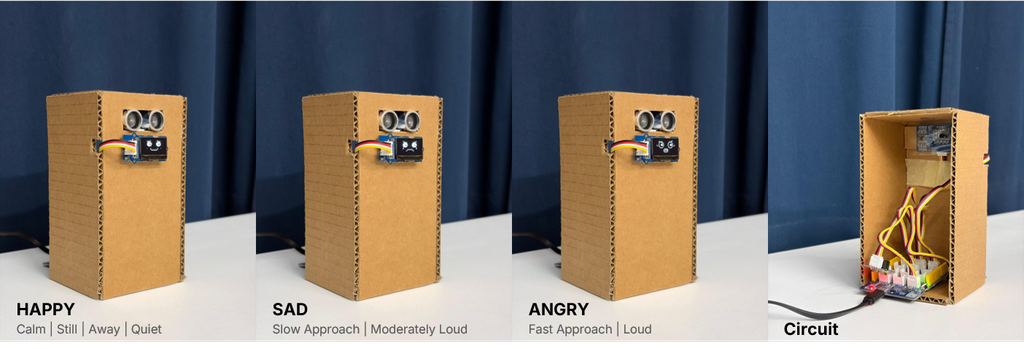
PROTOTYPE
DEMONSTRATION VIDEO
NEXT STEPS
Right now, Dobby can only show how it feels. The next step is to let it act on that feeling: with wheels and DC motors, the robot will back away when someone approaches too fast or makes too much noise, keeping its personal space instead of only reacting on its face.
In the long run, the same behaviour could move into smart furniture: desks, chairs or booths that sense crowding and noise and quietly signal when someone needs space, turning a small robot into a responsive part of the built environment.