
A Collaborative Human-in-the-Loop Clay Modelling System
The Question
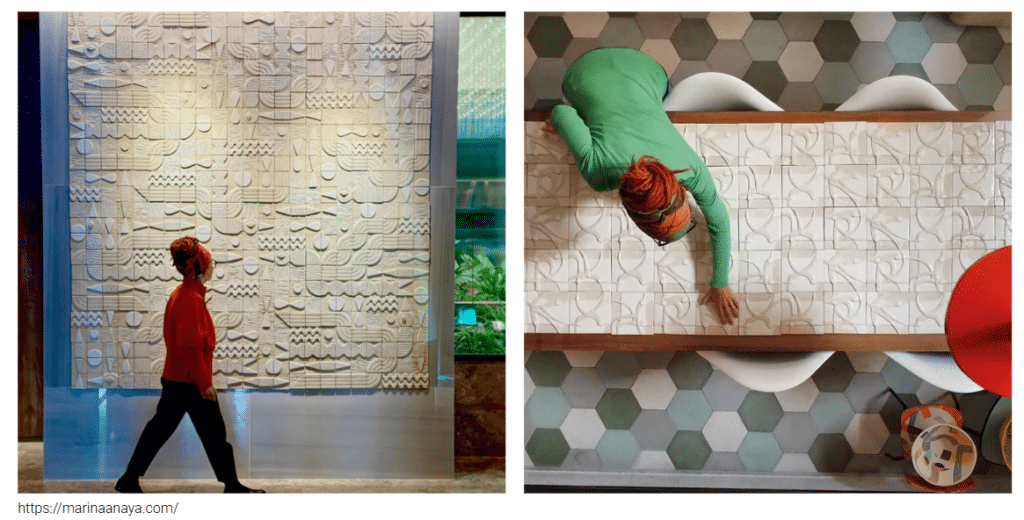
What if anyone could sculpt a wall like an artist?
That question sits at the center of Clay Create, a collective ceramic fabrication system where non-specialized users participate in the production of a wall of unique modules, each one manually shaped by a different person. The project does not try to automate craftsmanship. Instead, it asks what happens when computational guidance meets human hands and material resistance: when the system proposes, but the human decides.
The central argument is simple but consequential. Keeping the human in the loop means that deviation from the blueprint is not an error, it is the system’s most valuable input. Every time a participant shapes the clay differently from what was proposed, that difference becomes the starting point for the next cycle. The final wall is the accumulated record of all those decisions.
State of the Art
Prior work on bridging digital models and physical clay has moved in two directions. Sculpting by Numbers (2012) used a projector-camera pair to scan clay in progress and project a color depth map directly onto the surface, guiding novice users to replicate complex 3D models by hand. Augmenting Craft with Mixed Reality (2020) overlaid holographic instructions onto the sculptor’s field of vision via Microsoft HoloLens. At the other extreme, SculptBot (2023) removed the human entirely: a fully autonomous robotic system using four RealSense cameras and a pre-trained dynamics model to plan and execute subtractive operations without intervention.
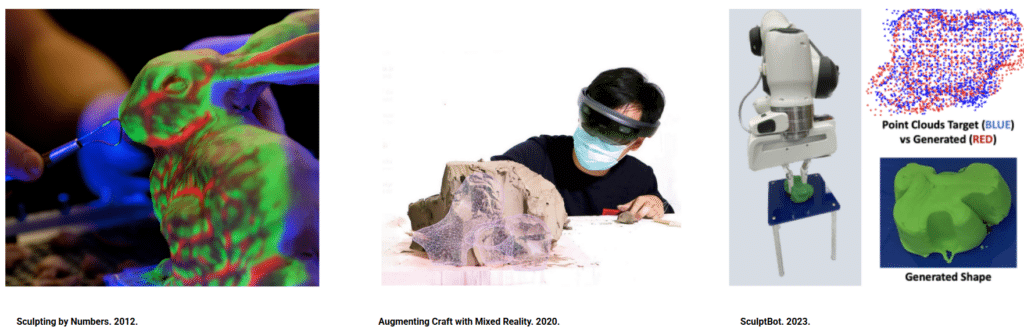
Clay Create sits deliberately between these poles, human-guided, not human-replaced.
System Architecture
The system is organized into five core modules that operate in sequence and in feedback with each other.
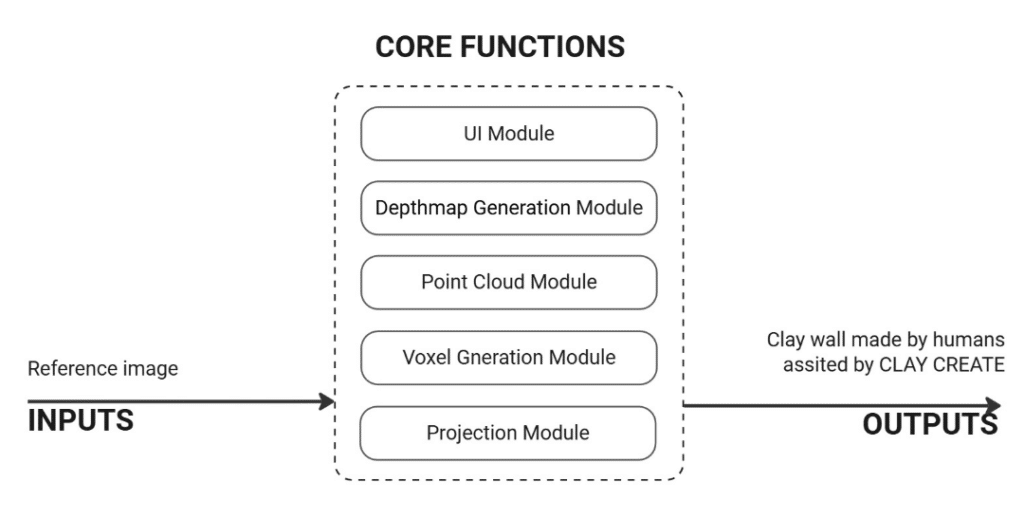
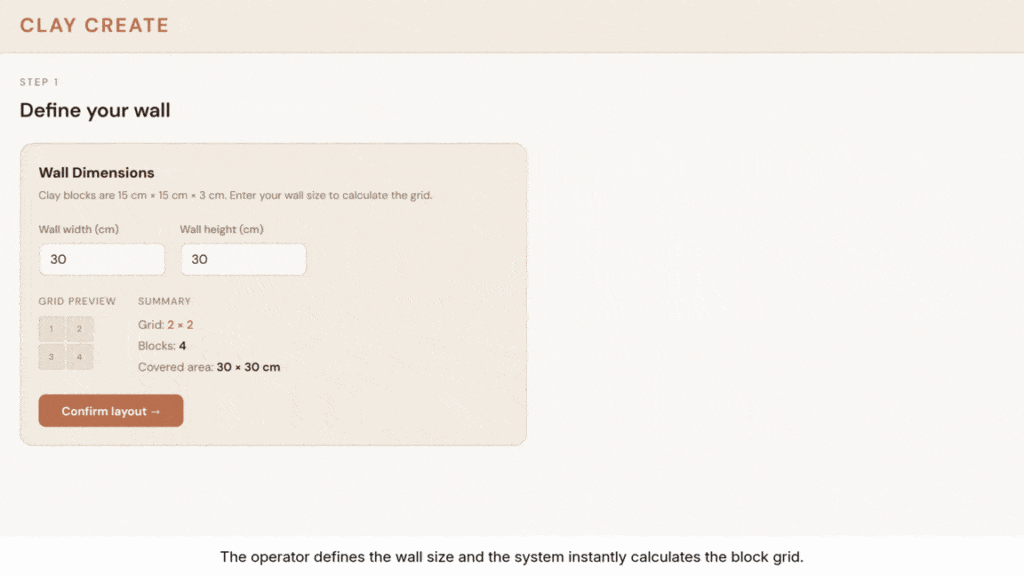
UI Module: A Flask/Socket.IO web application serves as the operator dashboard. The operator defines wall dimensions in centimeters; the system calculates the block grid automatically (15 × 15 × 3 cm tiles). Each block is assigned a state, sculpting, done, available, or locked, with sequential unlock logic that only opens neighbors of the last completed block. A participant name is assigned per tile, a timer runs per session, and the full history is logged.
Depthmap Generation Module: When the operator uploads a reference image, it passes through a MiDaS depth estimation pipeline (256×256 input, float32 [0,1] heightmap output), blended 80/20 with a high-frequency detail pass. CLAHE and gamma correction are applied for contrast enhancement. The result is split into a cols×rows tile grid, each stored as a 256×256 grayscale PNG.
Point Cloud Module: Once a tile is being carved and the sculptor’s hands leave the surface for five seconds, the Orbbec/RealSense depth camera triggers a capture: 30 averaged frames, depth hole fill, outlier removal, and backprojection to 3D XYZ per pixel using camera intrinsics. A planar rectification step (SVD plane fit) levels the block surface horizontally before exporting the heightmap as a grayscale PNG.
Voxel Generation Module: A Grasshopper definition (GH_voxel_generation.gh) receives the current heightmap PNG and point cloud, constructs a 3D voxel grid at resolution matched to tile size, and applies a color gradient mapping: red = high (shallow carving needed), green = deep (target reached). Two output PNGs are produced, target_heatmap.png and progress_heatmap.png, and sent to the Projection Module via Socket.IO.
Projection Module: A fixed-pixel HTML file (projection.html) renders a three-column layout: grid status on the left, the MiDaS-generated blueprint in the center, and the live progress map on the right. The canvas is 706×578px. Updates arrive via image_update Socket.IO events with cache-busting timestamps, ensuring the projected surface refreshes without page reload.
System Workflow
The complete workflow follows eight sequential steps connecting the operator interface to the human fabricator and back:
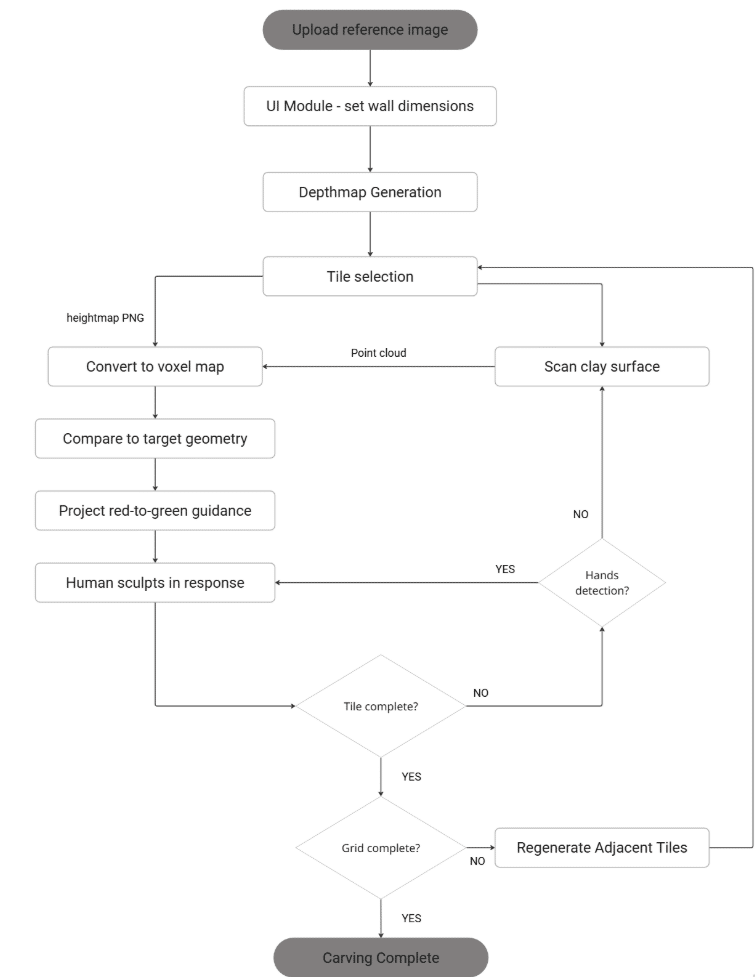
This loop has no fixed termination condition, the system accepts that the participant decides when a tile is “done,” not when the surface perfectly matches the target. Deviation is expected and absorbed.
Finite State Machines
The system’s interaction logic is governed by a Finite State Machine with seven states that map conditions to actions across the full fabrication cycle.
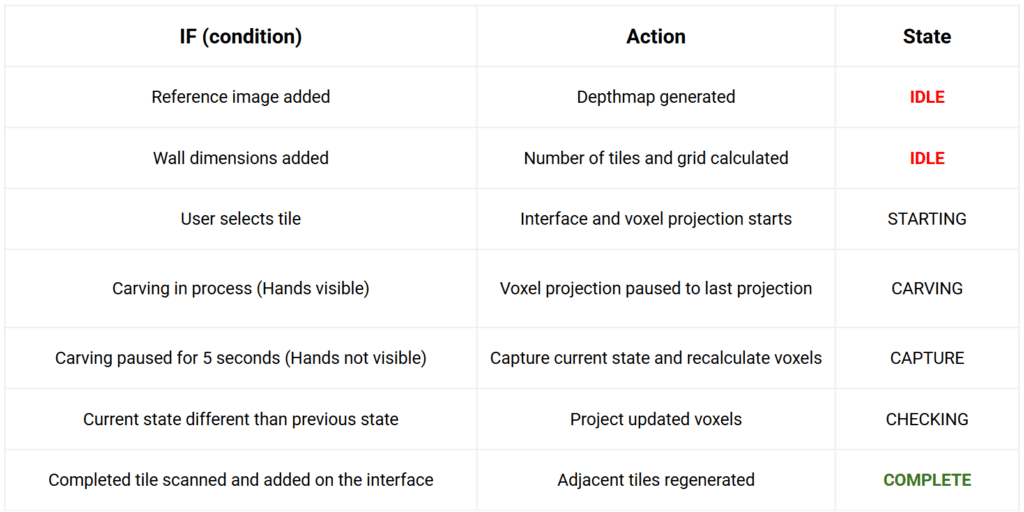
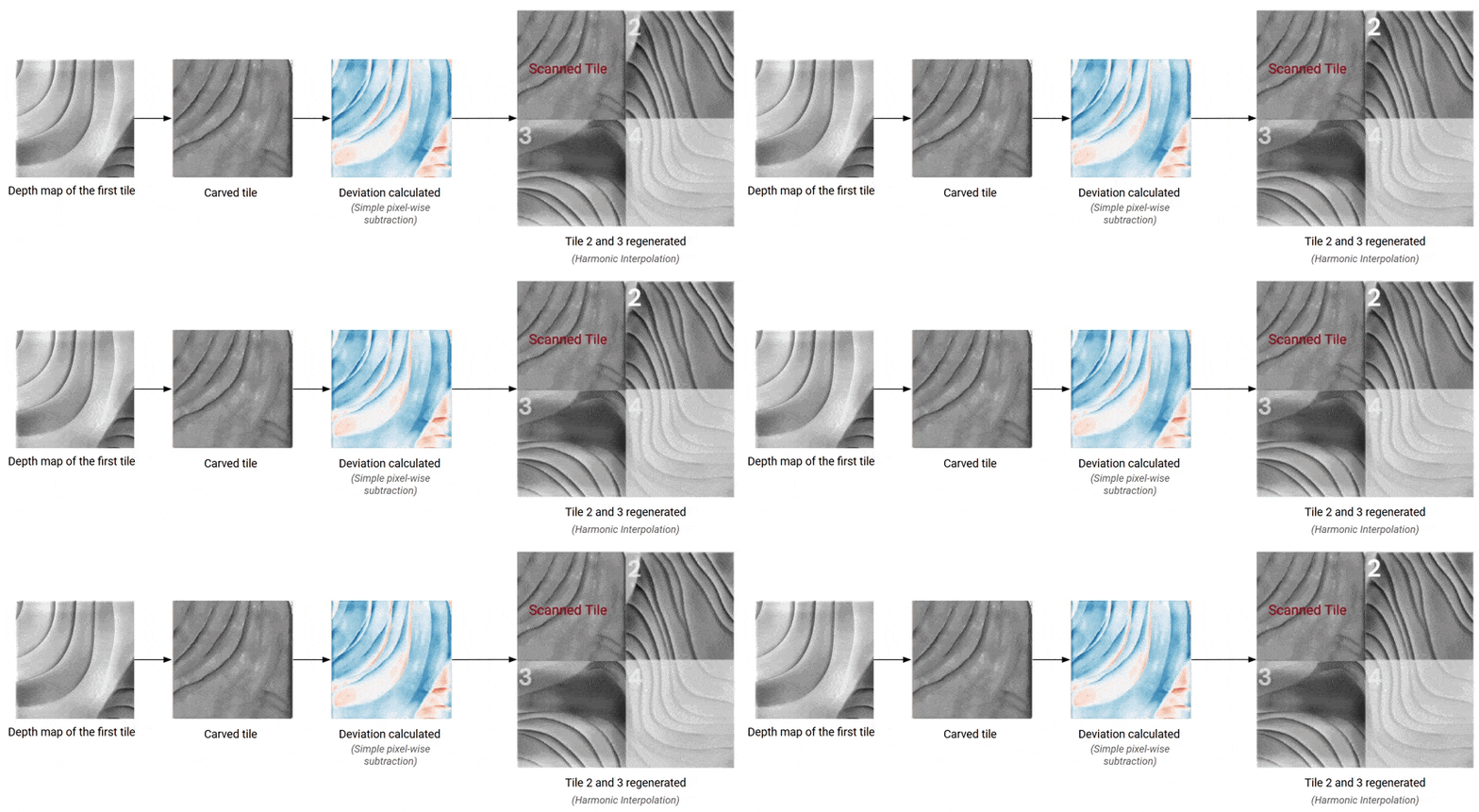
The FSM begins in IDLE during setup and moves to STARTING once a tile is selected. Hand presence drives the core loop: CARVING holds the last projection while the sculptor works; five seconds without hands triggers CAPTURE and voxel recalculation; if the surface has changed, CHECKING updates the projected guidance. This loop repeats until the operator marks the tile done, at which point COMPLETE registers the scan and regenerates adjacent tiles using the human’s actual carved geometry as the boundary condition for the next participant.
UI Module
Depthmap Generation Module
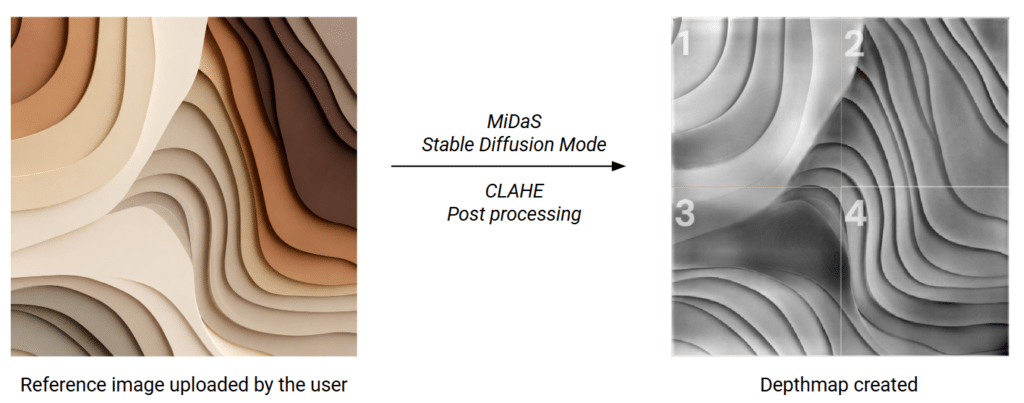
The operator uploads a reference image, any photograph or illustration with clear tonal variation works as input. The image passes through a MiDaS depth estimation pipeline running in Stable Diffusion mode, which infers a float32 [0,1] heightmap from the visual content. A CLAHE post-processing step then enhances local contrast, ensuring depth transitions are sharp and readable when projected onto clay.
The resulting grayscale heightmap is split into the configured tile grid, in the example above, a 2×2 arrangement producing four 256×256 PNG tiles, each numbered and stored as the sculpting target for its corresponding block.
Point Cloud Module
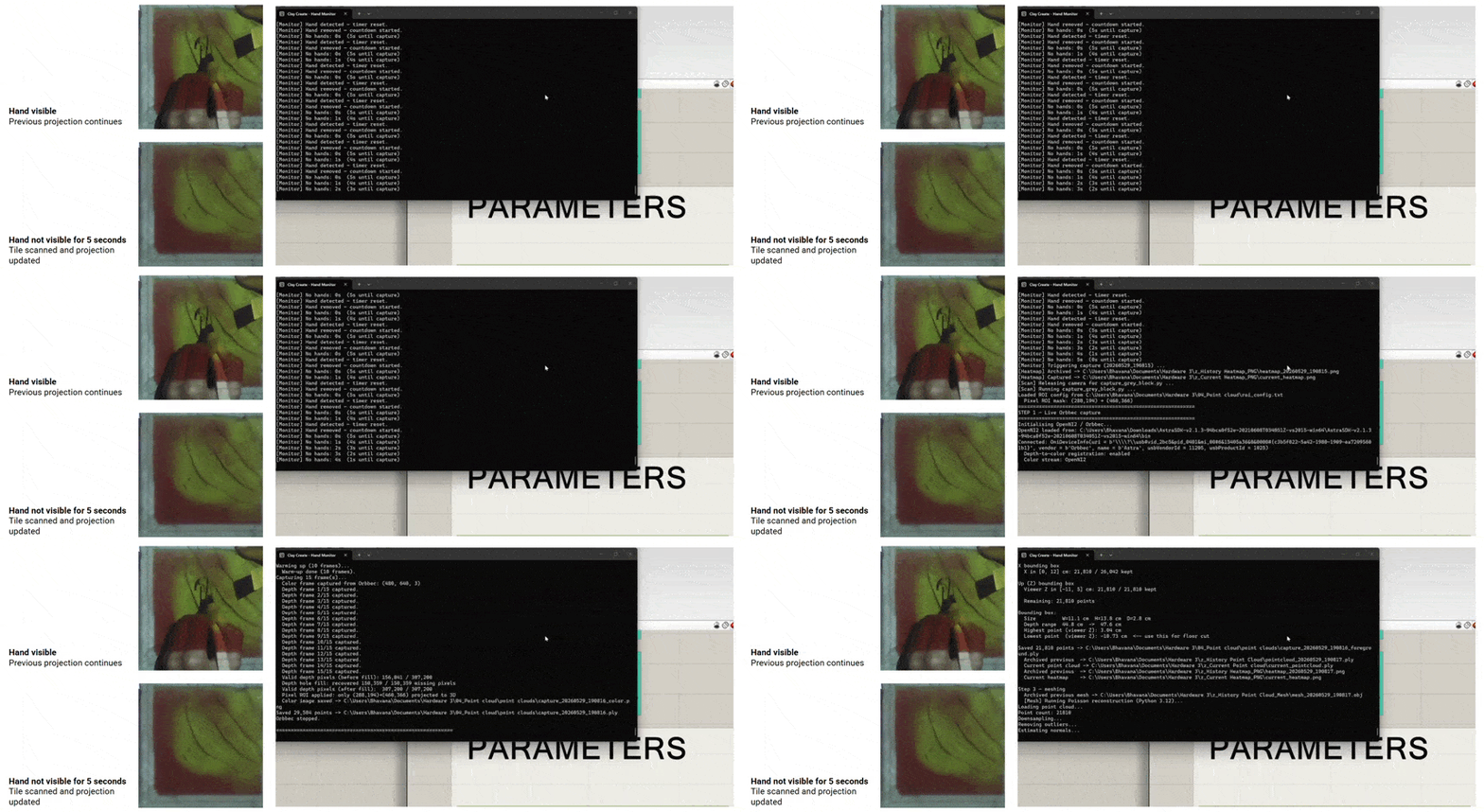
Surface capture is triggered automatically by absence, once the sculptor’s hands have been out of frame for five consecutive seconds, the depth camera takes a clean read of the clay surface. The captured point cloud is then parsed directly into the voxel generation pipeline.
The three-step flow is straightforward: no hands for 5 seconds → point cloud captured → parsed into voxel generation. The 5-second threshold is the key design decision: short enough to give frequent feedback during a carving session, long enough to avoid false triggers while the sculptor is still working.
Hand detection and Scanning
Regeneration of adjacent tiles
Voxel Generation Module
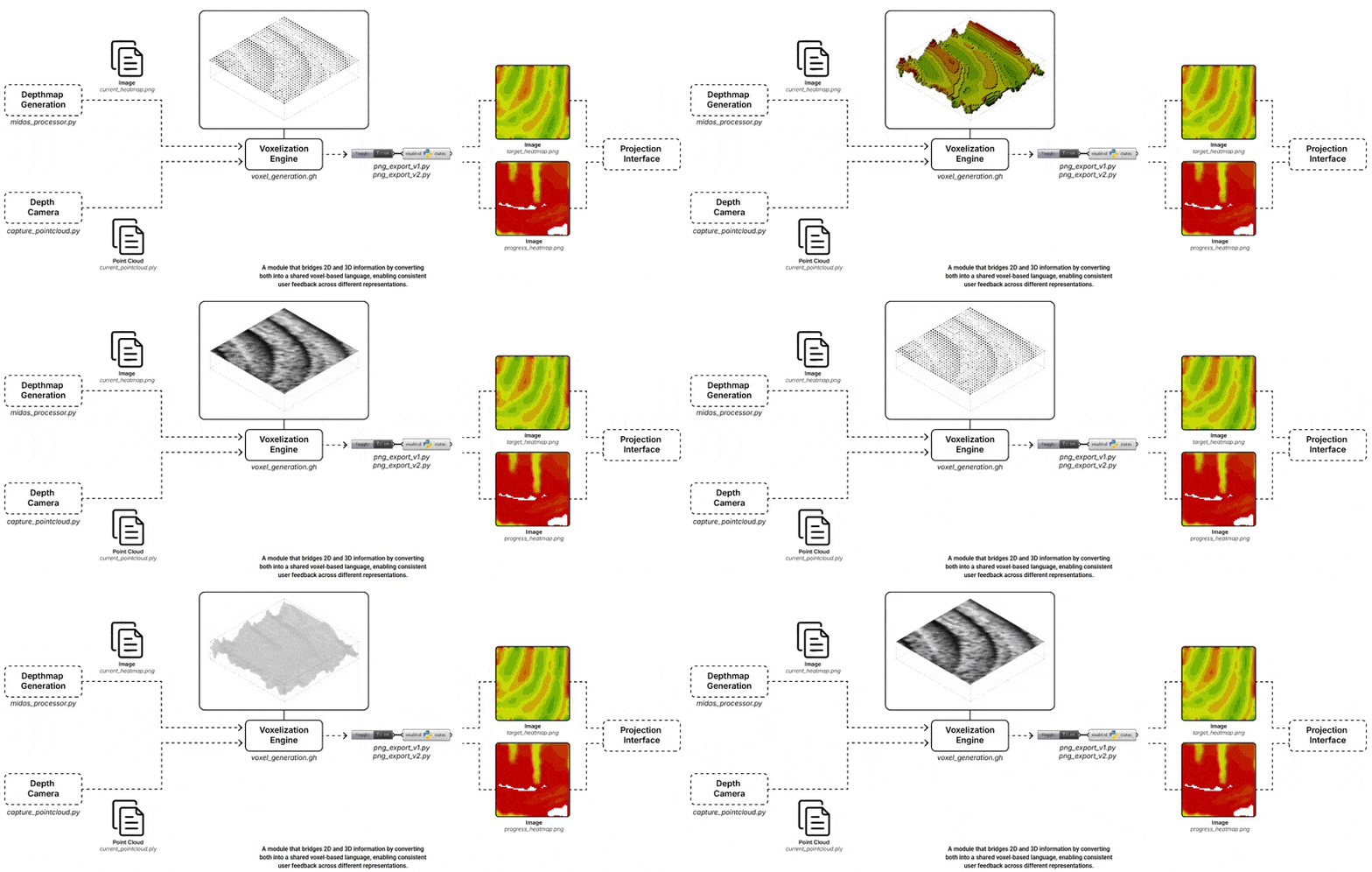
The Voxel Engine is the connective tissue of the system, a common language that bridges 2D and 3D information so that both the MiDaS-generated heightmap and the depth camera point cloud can be compared on equal terms.
The Grasshopper definition (voxel_generation.gh) takes two inputs: current_heatmap.png from the depthmap generation module and current_pointcloud.ply from the depth camera. It constructs a 3D voxel grid from both, then exports two output images, target_heatmap.png and progress_heatmap.png, which are sent directly to the Projection Interface.
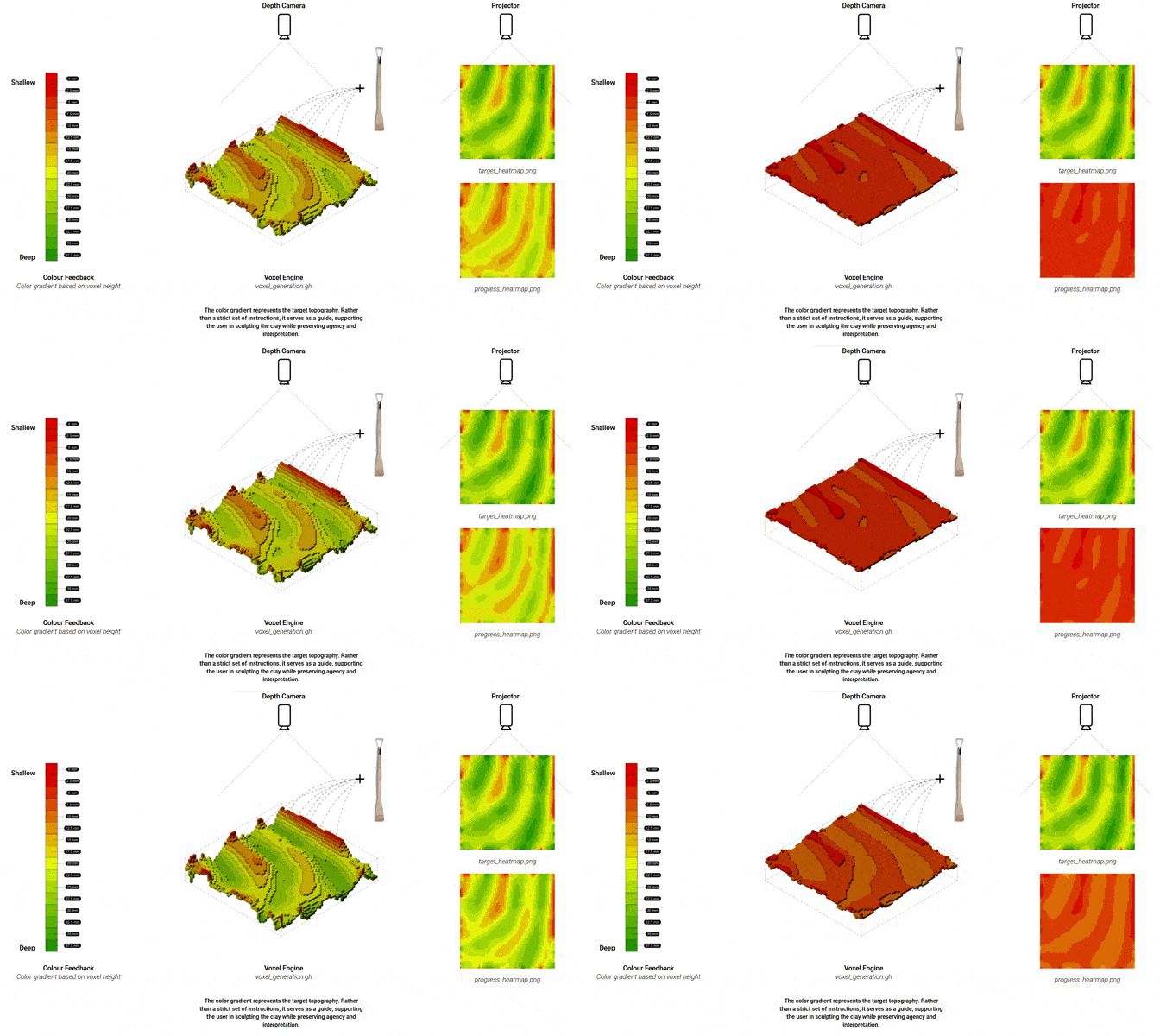
The color system is what the sculptor actually sees. A gradient running from red (shallow, 0mm) to green (deep, 37.5mm) is mapped onto the voxel height values and projected onto the clay surface. Red areas still have material to remove; green areas have reached the target depth. Rather than prescribing exact tool paths, the color gradient serves as a guide, supporting the user’s decisions while preserving agency and interpretation.
Projection Module
The projection interface also went through two iterations. V1 displayed a grid of block states alongside the heightmap and a scan process view, functional but abstract, with no visual reference to the actual clay being carved. V2 replaced the state grid with real depth-scanned photographs of each completed tile, added a tool panel with sculpting recommendations, and kept the heightmap and scan process view alongside.
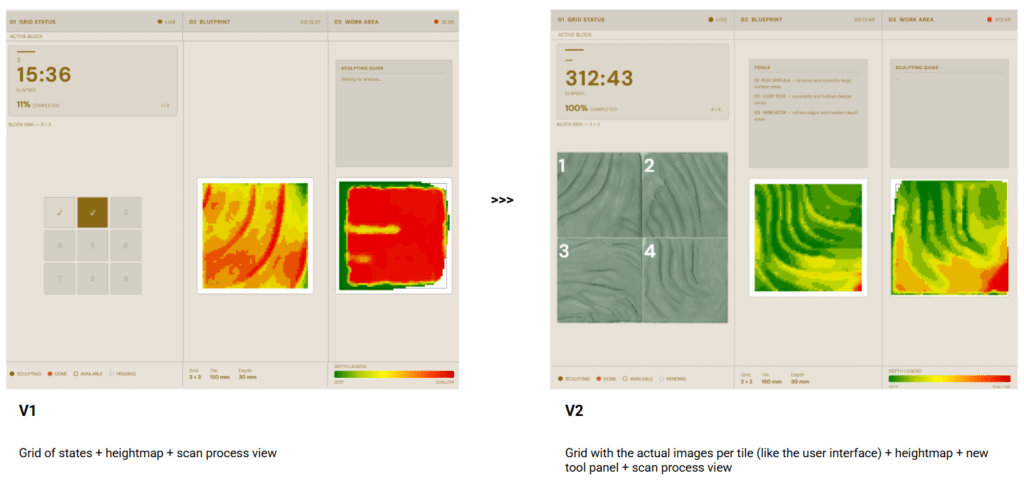
The final layout is a three-column design. Column 01 — Grid Status shows the live block grid with real photographs of completed tiles, session state data (sculpting, done, available, pending), and the elapsed timer. Column 02 — Blueprint displays the color-coded depth map generated from the MiDaS heightmap — this is the target relief the sculptor is working toward, with a deep-to-shallow gradient (green→red) and a reference legend at the bottom. Column 03 — Work Area shows the real-time depth map of the surface currently being carved, allowing continuous comparison against the blueprint, alongside a sculpting guide with tool recommendations.
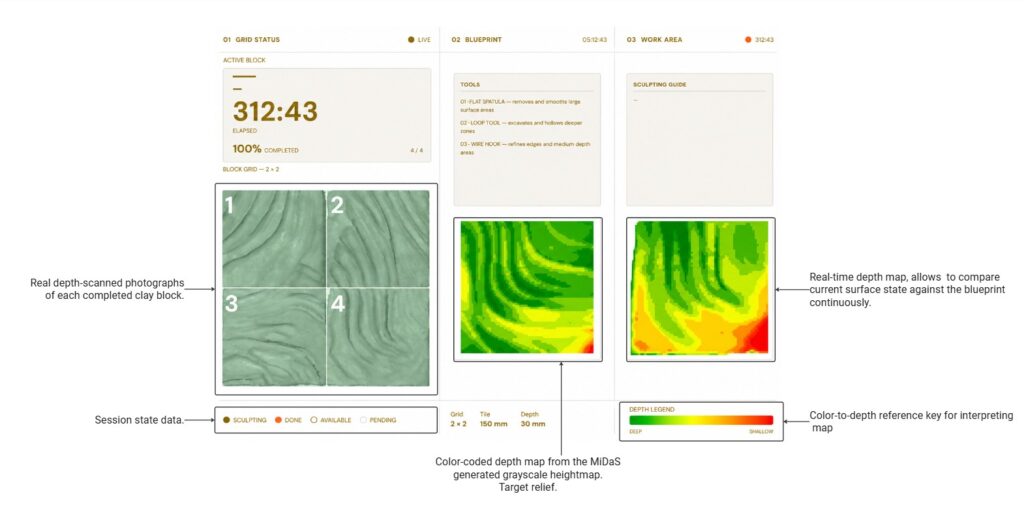
The interface updates via Socket.IO image_update events with cache-busting timestamps — no page reload required, no lag between operator actions and what appears on the projected surface.
RESUTLS
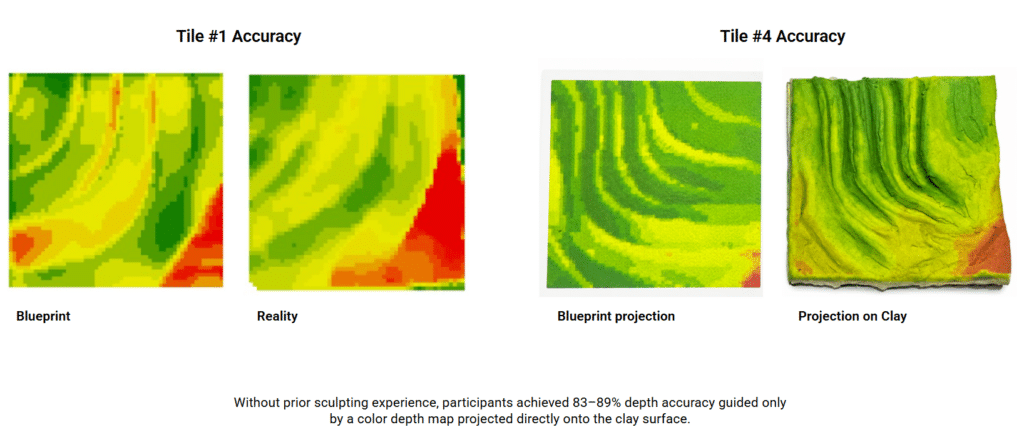
It’s not perfect but it’s human
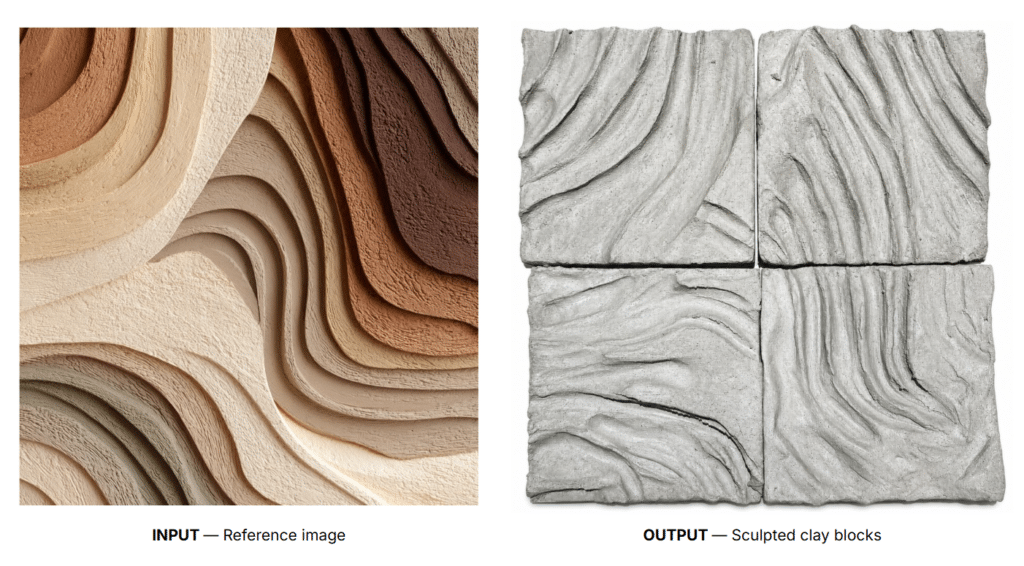
Clay Create challenges the conventional logic of digital fabrication by treating human deviation not as an error but as a valuable design input. Rather than pursuing precision and control, the system embraces uncertainty, negotiation, and collective authorship. The resulting wall is not the execution of a predefined plan but the physical record of a continuous dialogue between humans, material, and computation. In this context, technology becomes a platform for human agency rather than a mechanism for replacing it.
